

В этой краткой статье вы узнаете, как устранить ошибку «ОШИБКА 1130 (HY000): Хосту x.x.x.x не разрешено подключаться к этому серверу MySQL» при развертывании базы данных MySQL/MariaDB в системе Linux. , Это одна из распространенных ошибок подключения к удаленной базе данных, с которой сталкиваются пользователи.
Тестовая среда:
- IP-адрес сервера приложений: 10.24.96.5
- IP-адрес сервера базы данных: 10.24.96.6
Мы столкнулись с ошибкой при тестировании подключения к базе данных от одного из наших серверов приложений к серверу базы данных с использованием клиента mysql, как показано.
# mysql -u database_username -p -h 10.24.96.6

Ошибка указывает на то, что хосту 10.24.96.5, с которого подключается пользователь базы данных, не разрешено подключаться к серверу MySQL. В этом случае мы должны внести некоторые изменения в сервер базы данных, чтобы пользователь мог подключаться удаленно.
На сервере базы данных мы должны проверить хост, с которого указанному выше пользователю разрешено подключаться.
# mysql -u root -p
Запустите следующие команды SQL, чтобы проверить хост пользователя:
MariaDB [(none)]> SELECT host FROM mysql.user WHERE user = "database_username";

Из вывода команды пользователю разрешено подключаться к серверу базы данных только с localhost. Итак, нам нужно обновить хосты пользователя следующим образом.
MariaDB [(none)]> GRANT ALL ON database_name.* to 'database_username'@'10.24.96.5' IDENTIFIED BY 'database_password';MariaDB [(none)]> FLUSH PRIVILEGES;MariaDB [(none)]> SELECT host FROM mysql.user WHERE user = "database_username";

Чтобы предоставить пользователю удаленный доступ со всех хостов в сети, используйте следующий синтаксис:
MariaDB [(none)]> GRANT ALL ON database_name.* to 'database_username'@'10.24.96.%' IDENTIFIED BY 'database_password';
После внесения вышеуказанных изменений попробуйте еще раз удаленно подключиться к серверу базы данных MySQL. Соединение должно быть успешным, как показано на следующем снимке экрана.
# mysql -u database_username -p -h 10.24.96.6

Мы надеемся, что это решение помогло вам устранить ошибку удаленного подключения Mysql. Если у вас есть какие-либо вопросы, свяжитесь с нами через форму обратной связи ниже.
6.2.17 Troubleshooting Problems Connecting to MySQL
I have 2 servers with digitalocean — web (nginx) and database (mysql) servers — and can’t get a connection from the web to the mysql server.
mysql> SELECT User,Host FROM mysql.user;
+-------+--------------+------------+
| User | Host | Grant_priv |
+-------+--------------+------------+
| root | localhost | Y |
| root | dev-db01 | Y |
| root | 127.0.0.1 | Y |
| root | ::1 | Y |
| | localhost | N |
| | dev-db01 | N |
| admin | % | N |
| admin | localhost | N |
| admin | xx.xxx.x.xxx | N |
+-------+--------------+------------+
mysql> GRANT ALL PRIVILEGES ON *.* TO 'admin'@'xx.xxx.x.xxx' WITH GRANT OPTION;
mysql> GRANT ALL PRIVILEGES ON *.* TO 'admin'@'%' WITH GRANT OPTION;
mysql> GRANT ALL PRIVILEGES ON *.* TO 'admin'@'localhost' WITH GRANT OPTION;
mysql> FLUSH PRIVILEGES;I haven’t set up a firewall yet, so can telnet from the webserver to the mysql server, and connect before being rejected:
telnet xx.xxx.x.xx 3306
Trying xx.xxx.x.xx...
Connected to xx.xxx.x.xx.
Escape character is '^]'.
EHost 'xx.xxx.x.xx' is not allowed to connect to this MySQL serverConnection closed by foreign host.
My goal is to create a database via the remote connection from the web server to the mysql server using doctrine as part of a symfony app. Here’s the relevant part of app/config/parameters.yml if helpful:
sudo vi app/config/parameters.yml
parameters:
database_driver: pdo_mysql
database_host: xx.xxx.x.xx
database_port: 3306
database_name: appdatabasename
database_user: admin
database_password: ~
Set up details:
- VPS: DigitalOcean
- MySQL Server Ver: 5.7
- OS: FreeBSD 10.1
I’m really confused. Any ideas?
Test Environment:
- Application Server IP: 10.24.96.5
- Database Server IP: 10.24.96.6
We encountered the error while testing database connection from one of our app servers to a database server, using the mysql client as shown.
# mysql -u database_username -p -h 10.24.96.6

# mysql -u root -p
MariaDB [(none)]> SELECT host FROM mysql.user WHERE user = "database_username";
MariaDB [(none)]> GRANT ALL ON database_name.* to 'database_username'@'10.24.96.5' IDENTIFIED BY 'database_password';MariaDB [(none)]> FLUSH PRIVILEGES;MariaDB [(none)]> SELECT host FROM mysql.user WHERE user = "database_username";
MariaDB [(none)]> GRANT ALL ON database_name.* to 'database_username'@'10.24.96.%' IDENTIFIED BY 'database_password';
# mysql -u database_username -p -h 10.24.96.6
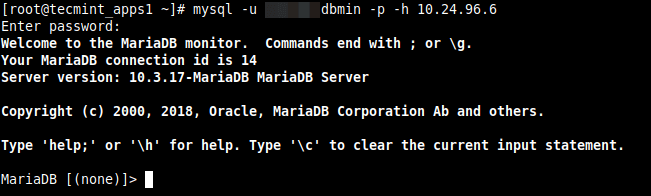
We hope this solution helped you in solving your Mysql remote connection error. If have any queries reach us via the feedback form below.

32 gold badges135 silver badges209 bronze badges
asked Dec 10, 2009 at 3:23
Open up a terminal.
$ mysql -u root --host=127.0.0.1 -p<yourpassword>
Welcome to the MySQL monitor. Commands end with ; or \g.
Your MySQL connection id is 521
Server version: 5.1.38yes-debug yes
Type 'help;' or '\h' for help. Type '\c' to clear the current input statement.
mysql> CREATE USER 'root'@'localhost' IDENTIFIED BY "<yourpassword>";
Query OK, 0 rows affected (0.22 sec)
mysql> GRANT ALL PRIVILEGES ON *.* TO 'root'@'localhost;
Query OK, 0 rows affected (0.08 sec)
This should fix your problem ;).
answered Dec 10, 2009 at 3:59

Dan Loewenherz
3 gold badges10 silver badges19 bronze badges
answered Dec 10, 2009 at 3:45

On your server run mysql from command line:
mysql -u root -p -h localhost -P 3306Then run this command in mysql shell:
>use mysql
>GRANT ALL ON *.* to root@'%' IDENTIFIED BY 'pass';
>FLUSH PRIVILEGES;
Have a nice time.
answered Dec 18, 2012 at 8:26

Combine dlo’s answer with Darren Chamberlain’s. The reason for this is that the special meaning that ‘localhost’ has in MySQL is that it signifies to use the local unix socket (mysql.sock) vs the TCP socket. This is why specifying 127.0.0.1 as the host will get you in so that you can fix the situation; it signifies to the MySQL client to use the TCP socket.
answered Dec 10, 2009 at 7:56

Problem
Host <hostname or IP> is not allowed to connect to this MySQL server
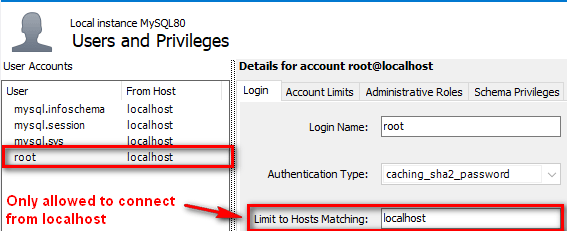
Solution – Add a user that allows any host
First, get on the server that is running MySQL. Then run the MySQL Command Line Client (mysql.exe).
mysql> FLUSH PRIVILEGES;Starting mysql.exe manually
If you’re getting an error like ‘mysql.exe is unknown’ or if you can’t find the MySQL Command Line Client shortcut, then you can start it manually using the full path and passing in some parameters.
Here’s an example of doing this on Windows:
"C:\Program Files\MySQL\MySQL Server 8.0\bin\mysql.exe" "--defaults-file=C:\ProgramData\MySQL\MySQL Server 8.0\my.ini" 


