
When you purchase AlphaSSL certificate and/or AlphaSSL Wildcard, you must need an intermediate certificate to install SSL on your server. Make use of AlphaSSL intermediate and root CA certificate to get additional level security.
Copy and Paste all characters include the —–BEGIN CERTIFICATE—– and —–END CERTIFICATE—– lines from the below box into a text editor and Save into your server.
Usually, whenever you see an SSL/TLS Certificate, you may think it’s quite straightforward. You simply purchase from an SSL/TLS Certificate provider, install it on your website for keeping your website visitor’s sensitive data secure, and it works effortlessly till it expires. It’s no hidden that most website owners don’t care about the certificate configuration or its renewal and let the professionals handle it alone.
Likewise, many are not even bothered about knowing the difference between the root certificates and intermediate certificates. But, if you’re one of those who likely gong to install your purchased SSL/TLS Certificate on your own, then it’s recommended that you go through this article and learn what’s certificate chains, and the difference among root certificates vs. intermediate certificates.
So, without delaying it further, let’s get into it.
If you’re installing an SSL/TLS Certificate on your own, and you’re a first-timer, then it’s not new that you may get surprised for a moment apart from the installation process, mainly because the ZIP archive folder which you receive in an email from the CA, consists of different SSL files.
Moreover, the file received by the CA via email includes the server certificate, which is specifically for your domain, and the other is the intermediate certificate, which helps you link your server’s certificate with the CA’s root certificate.
Also, if you’re thinking that these server certificates, root certificates, intermediate certificates, the chain of trust are getting onto your nerves, then go through this article, and you’ll learn about these certificates along with other things such as difference among the root certificates and intermediate certificates while learning what makes it so crucial for the working of the SSL/TLS. But, before jumping into these, let’s first look into the chain of trust and then the whole picture.
- AlphaSSL Root CA certificate
- New AlphaSSL / Wildcard Intermediate certificate
- What is an Intermediate Certificate?
- What is a Root Program?
- Root Certificates vs. Intermediate Certificates – Differences Explained
- Definition
- Value in the Chain of Trust
- Issuance
- Certificate Revoke
- Signature
- Issuance Name
- Certification Path
- Damage in case of Emergency
- Validation Period
- Access By
- Storage Security Protocol
- What is a Root Certificate?
- What is an Intermediate certificate?
- What are root and intermediate SSL certificates?
- What are root certificates?
- What are intermediate certificates?
- Where can I find root and intermediate certificates?
- Download root and intermediate SSL certificates
- Root and intermediate certificates
- AlphaSSL / AlphaSSL Wildcard
- SHA-1
- SHA-2
- Comodo PositiveSSL / Comodo PositiveSSL Wildcard / Comodo PositiveSSL Multi-Domain
- Root Certificate
- SHA-1
- SHA-2
- Comodo EssentialSSL / Comodo EssentialSSL Wildcard
- Root Certificate
- SHA-1
- SHA-2
- Comodo InstantSSL / Comodo InstantSSL Pro / Comodo InstantSSL Premium
- Root Certificate
- SHA-1
- SHA-2
- Comodo InstantSSL Wildcard / Comodo InstantSSL Multi-domain / Comodo Unified Communications SSL
- Root Certificate
- SHA-1
- SHA-2
- Comodo EV SSL / Comodo EV SGC SSL / Comodo EV Multi-domain SSL
- Root Certificate
- SHA-1 Intermediate
- SHA-2 Intermediate
- GeoTrust QuickSSL / GeoTrust QuickSSL Premium / GeoTrust QuickSSL Premium SAN
- SHA-1
- SHA-2
- GeoTrust TrueBusinessID / GeoTrust TrueBusinessID Wildcard / GeoTrust TrueBusinessID SAN
- SHA-1
- SHA-2
- GeoTrust TrueBusinessID EV / GeoTrust TrueBusinessID EV SAN
- SHA-1
- SHA-2
- GlobalSign DomainSSL / GlobalSign DomainSSL Wildcard
- SHA-1
- SHA-2
- GlobalSign OrganizationSSL / GlobalSign OrganizationSSL Wildcard
- SHA-1
- SHA-2
- GlobalSign ExtendedSSL
- SHA-1
- SHA-2
- RapidSSL / RapidSSL Wildcard
- SHA-1
- SHA-2
- Thawte SSL123
- SHA-1
- SHA-2
- Thawte SSL Web Server / Thawte SSL Web Server Wildcard
- SHA-1
- SHA-2
- Thawte SGC Supercert
- SHA-1
- SHA-2
- Thawte SSL Web Server EV
- SHA-1
- SHA-2
- Symantec Secure Site
- Root
- SHA-1
- SHA-2
- Symantec Secure Site Pro
- SHA-1
- SHA-2
- Symantec Secure Site with EV
- SHA-1
- SHA-2
- Symantec Secure Site Pro with EV
- Root
- SHA-1
- SHA-2
- Root Certificates and Intermediate certificates are chains of trust or the certificate path, which defines the relation between actual SSL certificate and Trusted CA.
- What is the Certificate Chain?
- Properties
- Identification of the Certificate Chain
- Root Certificate
- Intermediate Certificate
- Server Certificate (SSL Certificate)
- Final Words
AlphaSSL Root CA certificate
-----BEGIN CERTIFICATE-----
 MIIDdTCCAl2gAwIBAgILBAAAAAABFUtaw5QwDQYJKoZIhvcNAQEFBQAwVzELMAkG
 A1UEBhMCQkUxGTAXBgNVBAoTEEdsb2JhbFNpZ24gbnYtc2ExEDAOBgNVBAsTB1Jv
 b3QgQ0ExGzAZBgNVBAMTEkdsb2JhbFNpZ24gUm9vdCBDQTAeFw05ODA5MDExMjAw
 MDBaFw0yODAxMjgxMjAwMDBaMFcxCzAJBgNVBAYTAkJFMRkwFwYDVQQKExBHbG9i
 YWxTaWduIG52LXNhMRAwDgYDVQQLEwdSb290IENBMRswGQYDVQQDExJHbG9iYWxT
 aWduIFJvb3QgQ0EwggEiMA0GCSqGSIb3DQEBAQUAA4IBDwAwggEKAoIBAQDaDuaZ
 jc6j40+Kfvvxi4Mla+pIH/EqsLmVEQS98GPR4mdmzxzdzxtIK+6NiY6arymAZavp
 xy0Sy6scTHAHoT0KMM0VjU/43dSMUBUc71DuxC73/OlS8pF94G3VNTCOXkNz8kHp
 1Wrjsok6Vjk4bwY8iGlbKk3Fp1S4bInMm/k8yuX9ifUSPJJ4ltbcdG6TRGHRjcdG
 snUOhugZitVtbNV4FpWi6cgKOOvyJBNPc1STE4U6G7weNLWLBYy5d4ux2x8gkasJ
 U26Qzns3dLlwR5EiUWMWea6xrkEmCMgZK9FGqkjWZCrXgzT/LCrBbBlDSgeF59N8
 9iFo7+ryUp9/k5DPAgMBAAGjQjBAMA4GA1UdDwEB/wQEAwIBBjAPBgNVHRMBAf8E
 BTADAQH/MB0GA1UdDgQWBBRge2YaRQ2XyolQL30EzTSo//z9SzANBgkqhkiG9w0B
 AQUFAAOCAQEA1nPnfE920I2/7LqivjTFKDK1fPxsnCwrvQmeU79rXqoRSLblCKOz
 yj1hTdNGCbM+w6DjY1Ub8rrvrTnhQ7k4o+YviiY776BQVvnGCv04zcQLcFGUl5gE
 38NflNUVyRRBnMRddWQVDf9VMOyGj/8N7yy5Y0b2qvzfvGn9LhJIZJrglfCm7ymP
 AbEVtQwdpf5pLGkkeB6zpxxxYu7KyJesF12KwvhHhm4qxFYxldBniYUr+WymXUad
 DKqC5JlR3XC321Y9YeRq4VzW9v493kHMB65jUr9TU/Qr6cf9tveCX4XSQRjbgbME
 HMUfpIBvFSDJ3gyICh3WZlXi/EjJKSZp4A==
 -----END CERTIFICATE-----
New AlphaSSL / Wildcard Intermediate certificate
-----BEGIN CERTIFICATE-----
 MIIESzCCAzOgAwIBAgIOSMqBefg+ikLz9c3isT8wDQYJKoZIhvcNAQELBQAwTDEg
 MB4GA1UECxMXR2xvYmFsU2lnbiBSb290IENBIC0gUjMxEzARBgNVBAoTCkdsb2Jh
 bFNpZ24xEzARBgNVBAMTCkdsb2JhbFNpZ24wHhcNMTYxMDE0MDAwMDAwWhcNMjQw
 MjIwMTAwMDAwWjBMMQswCQYDVQQGEwJCRTEZMBcGA1UEChMQR2xvYmFsU2lnbiBu
 di1zYTEiMCAGA1UEAxMZQWxwaGFTU0wgQ0EgLSBTSEEyNTYgLSBHMjCCASIwDQYJ
 KoZIhvcNAQEBBQADggEPADCCAQoCggEBANoB7OTsc2D7fo9qt8YX45JkMtSsANmi
 D7nt7muKhsqSZ9l0111HAjyPQNaebRTNw9opOacPBQpoomYaHsSyi3ZY5atdHY9A
 szmL7x6DfSLQ46kALuxTz2IZhUQoTMAny3sO7BBkABCkBcygcr5BbDFbSOSx7Lkj
 61VN0H1iSqW0paRZhcUlkab+pgmfBhBtj4EMZEBecwCa4C5lmFQQAHCYyOHtNF/Y
 nMcNwNYjWUX8/lV6hu6UYCLxrtHmVUb2mcUbCHRfrLBkhI+JOByhp5AhTwJuveBh
 Z9T4QocPCvfJBG0qqS/vQqXf3aNT25gegfmacnta3k8+f6JYoOIXrWcCAwEAAaOC
 ASkwggElMA4GA1UdDwEB/wQEAwIBBjASBgNVHRMBAf8ECDAGAQH/AgEAMB0GA1Ud
 DgQWBBT1zdU8CFD5ak86t5faVoPmadJo9zAfBgNVHSMEGDAWgBSP8Et/qC5FJK5N
 UPpjmove4t0bvDA+BggrBgEFBQcBAQQyMDAwLgYIKwYBBQUHMAGGImh0dHA6Ly9v
 Y3NwMi5nbG9iYWxzaWduLmNvbS9yb290cjMwNgYDVR0fBC8wLTAroCmgJ4YlaHR0
 cDovL2NybC5nbG9iYWxzaWduLmNvbS9yb290LXIzLmNybDBHBgNVHSAEQDA+MDwG
 BFUdIAAwNDAyBggrBgEFBQcCARYmaHR0cHM6Ly93d3cuZ2xvYmFsc2lnbi5jb20v
 cmVwb3NpdG9yeS8wDQYJKoZIhvcNAQELBQADggEBAFsnfA30jsQHf3U8XxeJUHhV
 EpESFSNyt7yf/zboXTvy7RG7hgFugyWfcS4WIhHIy9yYoTfSuFCj73Clc6x62EP7
 5ros/YN38Q7zjaJKdSdJJ5+9Kq4fFQ5itED807y5maAzrMG4indOACzP9swinQ7C
 daRO4z00bN2CKgJd4S0wQ6hQYqodPYLoRVZI2yqAxNGBI0DozuwiIQpYLPMk/Rza
 vArdFMtyyKsWVCgQnRBCIS7AXUHHQcCasd5fg3WhZSLJRInEXALy4k5bGxjtNeby
 CV/akHyNQxN+Lw3E4hxAT4wK0emK+UOQP3RbzWnljGbrVy56GKcQupSlAkclrDo=
 -----END CERTIFICATE-----
What is an Intermediate Certificate?
Certificate Authorities (CAs) are very cautious when it comes to the issuance of SSL certificates. They avoid direct issuance of server certificates via roots since it’s perilous and may boost fraud.
Roots are precious, and hence multiple root CAs are not advisable. To shield these roots and address this problem, intermediate CAs were introduced. They served as an additional security layer by taking over all the tasks of root CAs.
The keys of the root CA are inaccessible, and hence intermediate certificates act as a mediator between the root CA and the last certificate.
When signed (with private key), intermediate roots are issued by CAs; they become more reliable. The next step done by CAs is using the same private key to sign end-point SSL certificates. Finally, post signature of the same, SSL certificate is issued to the respective site owner.
In the case of the involvement of multiple intermediate certificates, the same process is done multiple times. Here, one intermediate root signs the next intermediate root, and all these can be used by the CA to sign the final SSL certificate.
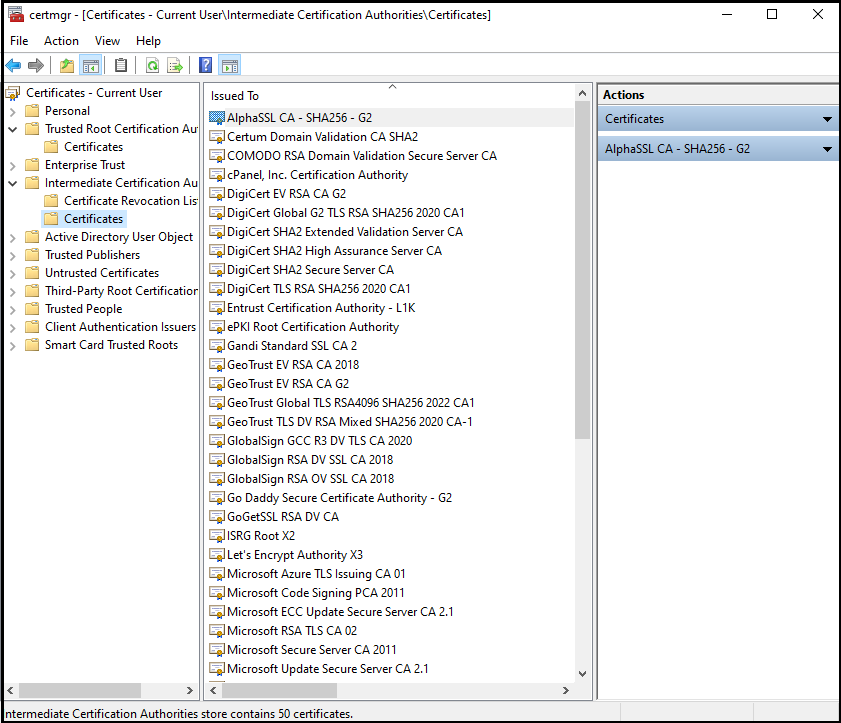
When root CAs are to be identified, browsers make use of these intermediate certificates. In addition, these certificates are also used for the acceptance of the server certificates.
You might now have a clear picture of why the SSL folder has an intermediate certificate apart from the primary certificate. As far as the validity of these certificates is concerned, they have a better validity period than SSL certificates.
What is a Root Program?
Every single device includes a root store, a storage house for all root certificates downloaded up to date. The device uses the root store, which is supported and suggested by the operating system. At times, it may prefer a completely new root store (third-party) through the web browser.
When the Certificate Authorities issue the certificates, the root certificate is affixed in the root store. It is a valuable certificate since it’s digitally signed with its private key. This digital signature makes this certificate more trustworthy amongst popular browsers.
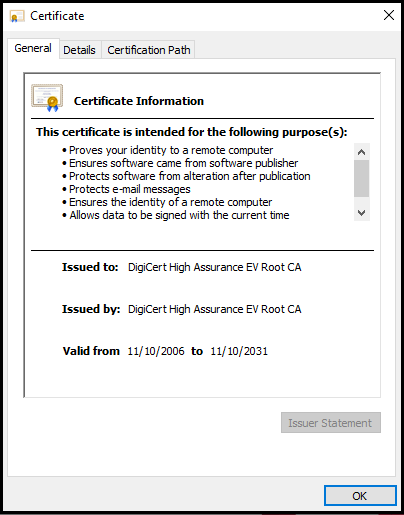
This certificate has a huge validity period (25 years), and it helps in the issuance of other certificates.
Note: CA’s have varied roots for site owners to secure their web. The image clarifies the same.
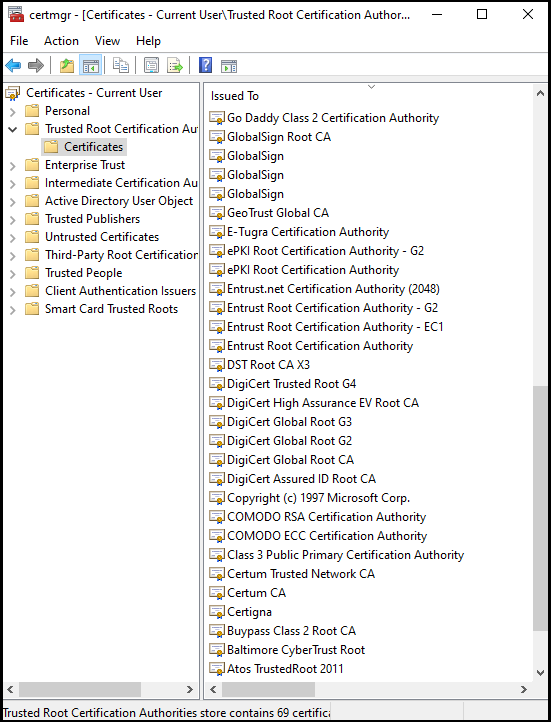
Issuance of certificates from these roots is genuine, and hence they have named them the chain of trust.
Root Certificates vs. Intermediate Certificates – Differences Explained
Definition
The root certificates are CAs that possess reliable roots, which are stored on all the global browsers.
The intermediate certificates are CAs that provide intermediate roots. They don’t use browser storage but are chained to third-party roots.
Value in the Chain of Trust
The root certificate is precious and has a higher value in the trust chain than an intermediate certificate.
The intermediate certificate has a lesser value in the trust chain. It works as an intermediary.
Issuance
The root certificates prevent the CA from direct issuance of SSL certificates. Instead, they take the help of intermediate certificates to sign the endpoint (SSL) certificates for preventing breaches.
The intermediate certificate is the middleman, who protects the root certificate and issues the SSL certificates by signing the intermediates.
Certificate Revoke
In case of revocation of a certificate due to any emergency, root certificates need not be revoked.
In case of emergencies, intermediate certificates will be revoked to prevent damages. All the concerned intermediates will be suspected and removed.
Signature
The root certificate uses the private key to sign the intermediate certificate.
The intermediate certificate uses the same key to sign other intermediate certificates, if any, and the end-point certificate.
Issuance Name
The names against the “Issued to” and the “Issued by” fields are the same in the root certificate.
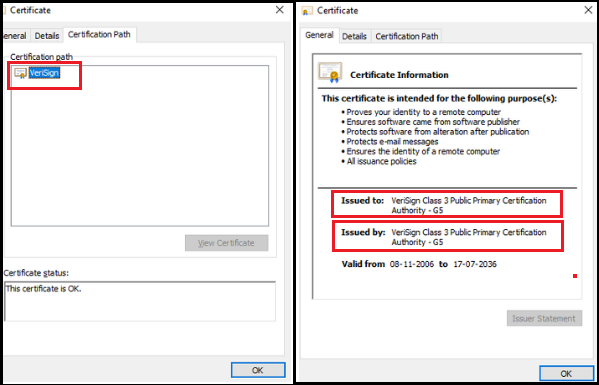
The same is not true in the case of an intermediate certificate.
Certification Path
The root certificates display the top-most appearance in the certificate chain in the Trusted Root Certification Authorities folder. This path comprises a single level.
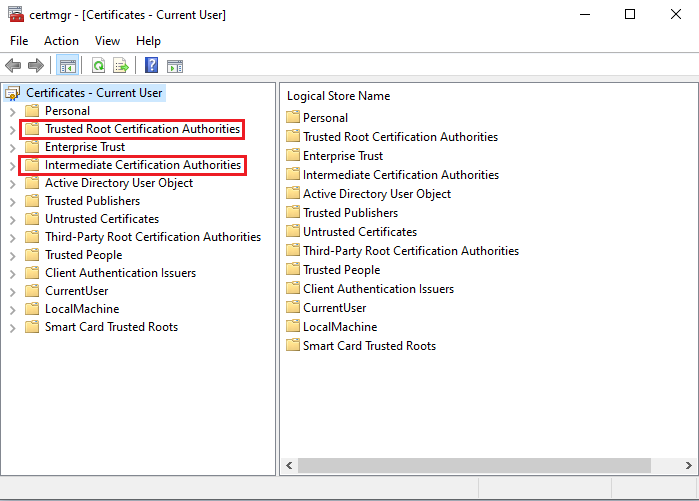
The intermediate certificates are in the Intermediate Certification Authorities Tab in the Console root folder. It may have more intermediates and more levels.
Damage in case of Emergency
If the root certificate has been tampered with, it may cause huge damages since the hacker can access the whole PKI and compromise the trust in the entire chain hierarchy. Hence, it’s advisable to keep this certificate offline for limiting its boundaries.
If the intermediate certificate has been tampered with, it becomes non-usable. The only option is to remove the same as well as the other intermediates to prevent further damages.
Validation Period
The validation period in the root certificate is usually up to 10 to 20 years.
The validation period in the intermediate certificate is restricted up to 1 or 2 years.
Access By
The Root Store accesses the root certificate. The Private Key accesses the intermediate certificate.
Storage Security Protocol
The root certificates are stored in the Hardware Security Module.
The intermediate certificates are stored in the SSL Installation Folder.
What is a Root Certificate?
A root certificate is an X.509 digital certificate positioned at the head of the chain of trust. It is said to be the pillar of PKI (Public Key Infrastructure)
Each device comprises a root store which has reliable CA signs. Apart from previously downloaded certificates, this store includes their public keys too.
Such catastrophes can be avoided by storing the root key in a secure place, i.e., the Hardware Security Module. This physical computing device safeguards the digital key, which has crypto processor chips to prevent infringement from cyber-criminals. Root certificates have the maximum validity period as compared to any other certificates.
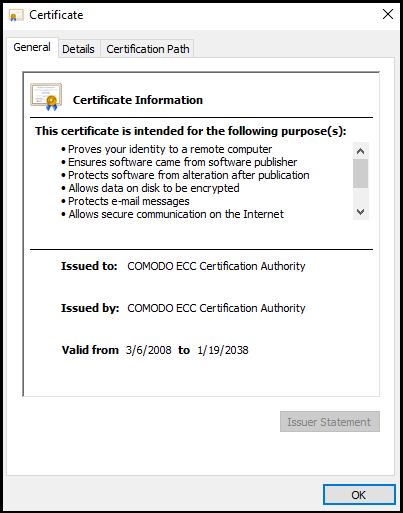
Root certificates are exquisite, and their reliability tends to enhance when they are digitally signed by their private key. Each carries different root certificates and attributes. They are all visible in this trust store.
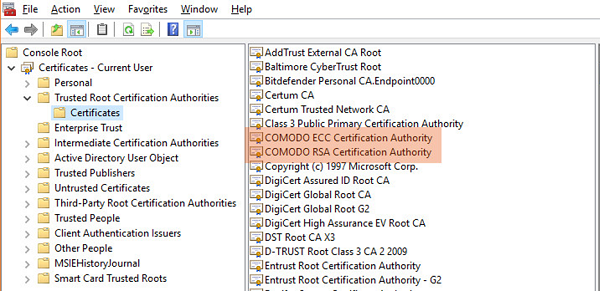
Can you see two Comodo root certificates that are highlighted in the above image?
One root cert is used for RSA signatures, and the other root cert is used for
All the root CAs present in the Trusted Root Certificate Authorities folder in the certificate store are occasionally updated by their respective operating system.
What is an Intermediate certificate?
An intermediate certificate is so called a chain certificate that plays a vital role in chaining the server certificate and the root certificate. It may happen that when a website owner gets SSL from a certificate authority, the browser or operating system may not explicitly know the CA. Therefore, to enable trust in the browser, there should be a duly signed intermediate certificate. With intermediate certificate, the browser will not show warnings while connecting to your website. It is an additional level of surety and security. The SSL certificate holder has to install an intermediate certificate along with the purchased SSL certificate to build a trust chain.
What are root and intermediate SSL certificates?
This article explains what root and intermediate SSL certificates are, and where to download them.
What are root certificates?
SSL security is built upon a Chain of Trust emanating downwards from the Certificate Authority (CA), the certificate’s emitter (GlobalSign, Comodo, Geotrust), to your own certificate, that is accepted by a browser because it contains the Certificate Authority’s digital signature, thus validating it. The identity of CA’s is built-in in web browsers through the addition of root certificates. Lacking a CA’s root certificate, no browser would know whether to accept an SSL certificate issued by that CA.
What are intermediate certificates?
When visiting a website secured by HTTPS, it’s fairly easy to view all SSL certificate information by clicking the padlock icon in your address bar, and hence selecting the certificate details. You’ll find www.kinamo.be’s certificate details below to illustrate this.
You will notice that this certificate is an Extended Validation certificate that was only issued after an in-depth audit. Going up in the certificate hierarchy, the certificate was signed by the Intermediate Certificate, GlobalSign Extended Validation SSL CA — SHA256 — G3, which in turn was issued and signed by GlobalSign’s root certificate, GlobalSign Root CA — R3.

Since intermediate certificates vary according to your type of certificate, you should always install the corresponding certificates on your web server. In absence of intermediate certificates, your visitor’s web browsers won’t accept your certificate, since there’s no uninterrupted chain of trust. It’s a common «Incomplete chain» error.
Where can I find root and intermediate certificates?
You’ll find all needed certificates on each Certificate Authority’s website, usually bundled in one file, for use on Apache for instance, or as separate downloads, for use in Microsoft IIS. Alternatively, save yourself some time and download all root and intermediate SSL certificates you need from Kinamo’s Certificate Download page.
Download root and intermediate SSL certificates
Root and intermediate certificates
If you’re having trouble finding the right files for your SSL certificate, or if you can’t find your certificate in the list, we’ll be glad to help you out. You may also find the different Knowledge Base articles about certificate installation on Apache, Nginx, Lighttpd, Tomcat, Microsoft IIS and Microsoft Exchange helpful.

Browse AlphaSSL SSL Certificates
AlphaSSL / AlphaSSL Wildcard
SHA-1
Globalsign Root R1 — SHA1
Serial 04:00:00:00:00:01:15:4b:5a:c3:94 Algorithm SHA-1 Public Key RSA 2048 bit Validity Sep 1 1998 — Jan 28 2028
AlphaSSL CA — G2 — R1 Intermediate Certificate
Serial 04:00:00:00:00:01:2f:4e:e1:37:02 Algorithm SHA-1 Public Key RSA 2048 bit Validity Apr 13 2011 — Apr 13 2022
SHA-2
Before 31/03/2014
Globalsign Root R3 — SHA256
Serial 04:00:00:00:00:01:21:58:53:08:a2 Algorithm SHA-256 Public Key RSA 2048 bit Validity Mar 18 2009 — Mar 18 2029
AlphaSSL CA — SHA256 — G2 — R3 Intermediate Certificate
Serial 04:00:00:00:00:01:31:89:c6:39:dc Algorithm SHA-256 Public Key RSA 2048 bit Validity Aug 2 2011 — Aug 2 2022
After 30/03/2014
Globalsign Root R1 — SHA1
Serial 04:00:00:00:00:01:15:4b:5a:c3:94 Algorithm SHA-1 Public Key RSA 2048 bit Validity Sep 1 1998 — Jan 28 2028
AlphaSSL CA — SHA256 — G2 — R1 Intermediate Certificate
Serial 04:00:00:00:00:01:44:4e:f0:36:31 Algorithm SHA-256 Public Key RSA 2048 bit Validity Feb 20 2014 — Feb 20 2024

Browse Comodo SSL Certificates
Comodo PositiveSSL / Comodo PositiveSSL Wildcard / Comodo PositiveSSL Multi-Domain
Root Certificate
Comodo AddTrust External CA Root Certificate
Serial 1 (0x1) Algorithm SHA-1 Public Key RSA 2048 bit Validity May 30 2000 — May 30 2020
SHA-1
Comodo PositiveSSL Certification Authority 2 Intermediate Certificate
Serial 07:6f:12:46:81:45:9c:28:d5:48:d6:97:c4:0e:00:1b Algorithm SHA-1 Public Key RSA 2048 bit Validity Feb 16 2012 — May 30 2020
SHA-2
Comodo RSA Certification Authority Intermediate Certificate
Serial 27:66:ee:56:eb:49:f3:8e:ab:d7:70:a2:fc:84:de:22 Algorithm SHA-384 Public Key RSA 4096 bit Validity May 30 2000 — May 30 2020
Comodo RSA Domain Validation Secure Server CA
Serial 2b:2e:6e:ea:d9:75:36:6c:14:8a:6e:db:a3:7c:8c:07 Algorithm SHA-384 Public Key RSA 2048 bit Validity Feb 12 2014 — Feb 11 2029
Comodo EssentialSSL / Comodo EssentialSSL Wildcard
Root Certificate
Comodo AddTrust External CA Root Certificate
Serial 1 (0x1) Algorithm SHA-1 Public Key RSA 2048 bit Validity May 30 2000 — May 30 2020
SHA-1
Comodo UserTrust Network Datacorp SGC Certification Authority Intermediate Certificate
Serial 46:ea:f0:96:05:4c:c5:e3:fa:65:ea:6e:9f:42:c6:64 Algorithm SHA-1 Public Key RSA 2048 bit Validity Jun 7 2005 — May 30 2020
Comodo Certification Authority (UTN) Intermediate Certificate
Serial 2e:79:83:2e:90:88:87:ea:8b:8e:f3:1a:6e:e6:7a:44 Algorithm SHA-1 Public Key RSA 2048 bit Validity Dec 1 2006 — May 30 2020
Comodo EssentialSSL Certification Authority Intermediate Certificate
Serial 18:b2:cb:ba:a3:04:f1:a0:0f:c1:f2:f3:26:46:2a:4a Algorithm SHA-1 Public Key RSA 2048 bit Validity Dec 1 2006 — Dec 31 2019
Comodo EssentialSSL CA Bundle — SHA-1
SHA-2
Comodo RSA Certification Authority Intermediate Certificate
Serial 27:66:ee:56:eb:49:f3:8e:ab:d7:70:a2:fc:84:de:22 Algorithm SHA-384 Public Key RSA 4096 bit Validity May 30 2000 — May 30 2020
Comodo RSA Domain Validation Secure Server CA
Serial 2b:2e:6e:ea:d9:75:36:6c:14:8a:6e:db:a3:7c:8c:07 Algorithm SHA-384 Public Key RSA 2048 bit Validity Feb 12 2014 — Feb 11 2029
Comodo InstantSSL / Comodo InstantSSL Pro / Comodo InstantSSL Premium
Root Certificate
Comodo AddTrust External CA Root Certificate
Serial 1 (0x1) Algorithm SHA-1 Public Key RSA 2048 bit Validity May 30 2000 — May 30 2020
SHA-1
Comodo High-Assurance Secure Server CA Intermediate Certificate
Serial 16:90:c3:29:b6:78:06:07:51:1f:05:b0:34:48:46:cb Algorithm SHA-1 Public Key RSA 2048 bit Validity Apr 16 2010 — May 20 2020
Comodo InstantSSL CA Bundle — SHA-1
SHA-2
Comodo RSA Certification Authority Intermediate Certificate
Serial 27:66:ee:56:eb:49:f3:8e:ab:d7:70:a2:fc:84:de:22 Algorithm SHA-384 Public Key RSA 4096 bit Validity May 30 2000 — May 30 2020
Comodo RSA Organization Validation Secure Server CA
Serial 36:82:5e:7f:b5:a4:81:93:7e:f6:d1:73:6b:b9:3c:a6 Algorithm SHA-384 Public Key RSA 2048 bit Validity Feb 12 2014 — Feb 11 2029
Comodo InstantSSL Wildcard / Comodo InstantSSL Multi-domain / Comodo Unified Communications SSL
Root Certificate
Comodo AddTrust External CA Root Certificate
Serial 1 (0x1) Algorithm SHA-1 Public Key RSA 2048 bit Validity May 30 2000 — May 30 2020
SHA-1
Comodo High-Assurance Secure Server CA Intermediate Certificate
Serial 16:90:c3:29:b6:78:06:07:51:1f:05:b0:34:48:46:cb Algorithm SHA-1 Public Key RSA 2048 bit Validity Apr 16 2010 — May 20 2020
Comodo InstantSSL CA Bundle — SHA-1
SHA-2
Comodo RSA Certification Authority Intermediate Certificate
Serial 27:66:ee:56:eb:49:f3:8e:ab:d7:70:a2:fc:84:de:22 Algorithm SHA-384 Public Key RSA 4096 bit Validity May 30 2000 — May 30 2020
Comodo RSA Organization Validation Secure Server CA
Serial 36:82:5e:7f:b5:a4:81:93:7e:f6:d1:73:6b:b9:3c:a6 Algorithm SHA-384 Public Key RSA 2048 bit Validity Feb 12 2014 — Feb 11 2029
Comodo EV SSL / Comodo EV SGC SSL / Comodo EV Multi-domain SSL
Root Certificate
Comodo AddTrust External CA Root Certificate
Serial 1 (0x1) Algorithm SHA-1 Public Key RSA 2048 bit Validity May 30 2000 — May 30 2020
SHA-1 Intermediate
Comodo Certification Authority Intermediate Certificate
Serial 6f:25:dc:15:af:df:5e:a3:08:56:0c:3b:7a:4f:c7:f8 Algorithm SHA-1 Public Key RSA 2048 bit Validity May 30 2000 — May 30 2020
Comodo Extended Validation Secure Server CA
Serial 11:a3:b4:d0:ec:8d:b7:7f:9d:a0:cd:5d:2d:51:2f:42 Algorithm SHA-1 Public Key RSA 4096 bit Validity May 24 2010 — May 30 2020
SHA-2 Intermediate
Comodo RSA Certification Authority Intermediate Certificate
Serial 27:66:ee:56:eb:49:f3:8e:ab:d7:70:a2:fc:84:de:22 Algorithm SHA-384 Public Key RSA 4096 bit Validity May 30 2000 — May 30 2020
Comodo RSA Extended Validation Secure Server CA
Serial 06:a7:43:80:d4:eb:fe:d4:35:b5:a3:f7:e1:6a:bd:d8 Algorithm SHA-384 Public Key RSA 2048 bit Validity Feb 12 2012 — Feb 11 2027

Browse GeoTrust SSL Certificates
GeoTrust QuickSSL / GeoTrust QuickSSL Premium / GeoTrust QuickSSL Premium SAN
SHA-1
GeoTrust Global Certification Authority Root Certificate
GeoTrust Certification Authority G2 Intermediate Certificate — SHA-1
SHA-2
GeoTrust Global Certification Authority Root Certificate
GeoTrust Certification Authority G3 Intermediate Certificate — SHA-2
GeoTrust TrueBusinessID / GeoTrust TrueBusinessID Wildcard / GeoTrust TrueBusinessID SAN
SHA-1
GeoTrust Global Certification Authority Root Certificate
GeoTrust Certification Authority G2 Intermediate Certificate — SHA-1
SHA-2
GeoTrust Global Certification Authority Root Certificate
GeoTrust Certification Authority G3 Intermediate Certificate — SHA-2
GeoTrust TrueBusinessID EV / GeoTrust TrueBusinessID EV SAN
SHA-1
GeoTrust Primary Certification Authority Root Certificate
GeoTrust Extended Validation Certification Authority Intermediate Certificate — SHA-1 — pre 2014
GeoTrust Extended Validation Certification Authority G2 Intermediate Certificate — SHA-1 — post 2013
SHA-2
GeoTrust Primary Certification Authority Root Certificate
GeoTrust Extended Validation Certification Authority G4 Intermediate Certificate — SHA-2

Browse GlobalSign SSL Certificates
GlobalSign DomainSSL / GlobalSign DomainSSL Wildcard
SHA-1
Globalsign Root R1 — SHA1
Serial 04:00:00:00:00:01:15:4b:5a:c3:94 Algorithm SHA-1 Public Key RSA 2048 bit Validity Sep 1 1998 — Jan 28 2028
Globalsign Domain Validation CA — G2
Serial 04:00:00:00:00:01:2f:4e:e1:41:43 Algorithm SHA-1 Public Key RSA 2048 bit Validity Apr 13 2011 — Apr 13 2022
SHA-2
Before 31/03/2014
Globalsign Root R3 — SHA256
Serial 04:00:00:00:00:01:21:58:53:08:a2 Algorithm SHA-256 Public Key RSA 2048 bit Validity Mar 18 2009 — Mar 18 2029
Globalsign Domain Validation CA — SHA256 — G2 — R3
Serial 04:00:00:00:00:01:31:89:c6:42:58 Algorithm SHA-256 Public Key RSA 2048 bit Validity Aug 2 2011 — Aug 2 2022
After 30/03/2014
Globalsign Root R1 — SHA1
Serial 04:00:00:00:00:01:15:4b:5a:c3:94 Algorithm SHA-1 Public Key RSA 2048 bit Validity Sep 1 1998 — Jan 28 2028
Globalsign Domain Validation CA — SHA256 — G2 — R1
Serial 04:00:00:00:00:01:44:4e:f0:3e:20 Algorithm SHA-256 Public Key RSA 2048 bit Validity Feb 20 2014 — Feb 20 2024
GlobalSign OrganizationSSL / GlobalSign OrganizationSSL Wildcard
SHA-1
Globalsign Root R1 — SHA1
Serial 04:00:00:00:00:01:15:4b:5a:c3:94 Algorithm SHA-1 Public Key RSA 2048 bit Validity Sep 1 1998 — Jan 28 2028
Globalsign Organization Validation CA — G2
Serial 04:00:00:00:00:01:2f:4e:e1:45:0c Algorithm SHA-1 Public Key RSA 2048 bit Validity Apr 13 2011 — Apr 13 2022
SHA-2
Before 31/03/2014
Globalsign Root R3 — SHA256
Serial 04:00:00:00:00:01:21:58:53:08:a2 Algorithm SHA-256 Public Key RSA 2048 bit Validity Mar 18 2009 — Mar 18 2029
Globalsign Organization Validation CA — SHA256 — G2 — R3
Serial 04:00:00:00:00:01:31:89:c6:44:c9 Algorithm SHA-256 Public Key RSA 2048 bit Validity Aug 2 2011 — Aug 2 2022
After 30/03/2014
Globalsign Root R1 — SHA1
Serial 04:00:00:00:00:01:15:4b:5a:c3:94 Algorithm SHA-1 Public Key RSA 2048 bit Validity Sep 1 1998 — Jan 28 2028
Globalsign Organization Validation CA — SHA256 — G2 — R1
Serial 04:00:00:00:00:01:44:4e:f0:42:47 Algorithm SHA-256 Public Key RSA 2048 bit Validity Feb 20 2014 — Feb 20 2024
GlobalSign ExtendedSSL
SHA-1
Globalsign Root R2 — SHA1
Serial 04:00:00:00:00:01:0f:86:26:e6:0d Algorithm SHA-1 Public Key RSA 2048 bit Validity Dec 15 2006 — Dec 15 2021
Globalsign Extended Validation CA — G2
Serial 04:00:00:00:00:01:2f:4e:e1:5b:63 Algorithm SHA-1 Public Key RSA 2048 bit Validity Apr 13 2011 — Apr 13 2022
SHA-2
Before 31/03/2014
Globalsign Root R3 — SHA256
Serial 04:00:00:00:00:01:21:58:53:08:a2 Algorithm SHA-256 Public Key RSA 2048 bit Validity Mar 18 2009 — Mar 18 2029
Globalsign Extended Validation CA — SHA256 — G2 — R3
Serial 04:00:00:00:00:01:31:89:c6:49:2e Algorithm SHA-256 Public Key RSA 2048 bit Validity Aug 2 2011 — Aug 2 2022
After 30/03/2014
Globalsign Root R2 — SHA1
Serial 04:00:00:00:00:01:0f:86:26:e6:0d Algorithm SHA-1 Public Key RSA 2048 bit Validity Dec 15 2006 — Dec 15 2021
Globalsign Extended Validation CA — SHA256 — G2 — R2
Serial 04:00:00:00:00:01:44:4e:f0:4a:55 Algorithm SHA-256 Public Key RSA 2048 bit Validity Feb 20 2014 — Dec 15 2012

Browse RapidSSL SSL Certificates
RapidSSL / RapidSSL Wildcard
SHA-1
GeoTrust Global CA Root Certificate
RapidSSL Primary Intermediate Certificate — SHA-1
RapidSSL Secondary Intermediate Certificate — SHA-1
RapidSSL PEM Intermediate CA Bundle — Apache & Tomcat — SHA-1
RapidSSL PKCS#7 Intermediate CA Bundle — Microsoft IIS & Tomcat — SHA-1
SHA-2
GeoTrust Global CA Root Certificate
RapidSSL Primary Intermediate Certificate — SHA-2
RapidSSL Secondary Intermediate Certificate — SHA-2
RapidSSL PEM Intermediate CA Bundle — Apache & Tomcat — SHA-2
RapidSSL PKCS#7 Intermediate CA Bundle — Microsoft IIS & Tomcat — SHA-2

Browse Thawte SSL Certificates
Thawte SSL123
SHA-1
Thawte Premium Server CA Root Certificate — SHA-1
Thawte Primary Root CA Intermediate Certificate — SHA-1
Thawte DV SSL CA Intermediate Certificate — SHA-1
Serial ?76 10 12 8a 17 b6 82 bb 3a 1f 9d 1a 9a 35 c0 92 Algorithm SHA-1 Public Key RSA 2048 bit Validity Feb 17 2010 — Feb 17 2020
Thawte SSL123 PEM Intermediate CA Bundle — Apache & Nginx — SHA-1
Thawte SSL123 PKCS#7 Intermediate CA Bundle — Microsoft IIS & Tomcat — SHA-1
SHA-2
Thawte Primary Intermediate Certificate — SHA-2
Thawte Secondary Intermediate Certificate — SHA-2 Thawte DV SHA256 SSL CA
Thawte SSL123 PEM Intermediate CA Bundle — Apache & Nginx — SHA-2
Thawte SSL Web Server / Thawte SSL Web Server Wildcard
SHA-1
Thawte Web Server Primary Intermediate Certificate — SHA-1
Thawte Web Server Secondary Intermediate Certificate — SHA-1
Thawte Web Server PEM Intermediate CA Bundle — Apache & Nginx — SHA-1
Thawte Web Server PKCS#7 Intermediate CA Bundle — Microsoft IIS & Tomcat — SHA-1
SHA-2
Thawte Web Server Primary Intermediate Certificate — SHA-2
Thawte Web Server Secondary Intermediate Certificate — SHA-2
Thawte Web Server SHA256 SSL CA Intermediate Certificate — SHA-2
Thawte Web Server PEM Intermediate Certificate Bundle — Apache & Nginx — SHA-2
Thawte SGC Supercert
SHA-1
Thawte SGC Primary Intermediate Certificate — SHA-1
Thawte SGC Secondary Intermediate Certificate — SHA-1
Thawte SGC Supercert PEM Intermediate Certificate Bundle — Apache & Nginx — SHA-1
SHA-2
Thawte SGC Supercert Primary Intermediate Certificate — SHA-2
Thawte SGC Supercert Secondary Intermediate Certificate — SHA-2
Thawte SGC Supercert SHA256 SSL CA Intermediate Certificate — SHA-2
Thawte SGC Supercert PEM Intermediate Certificate Bundle — Apache & Nginx — SHA-2
Thawte SSL Web Server EV
SHA-1
Thawte Extended Validation Primary Intermediate Certificate — SHA-1
Thawte Extended Validation Secondary Intermediate Certificate — SHA-1
Thawte Web Server EV PEM Intermediate Certificate bundle — Apache & Nginx — SHA-1
SHA-2
Thawte Extended Validation Primary Intermediate Certificate — SHA-2
Thawte Extended Validation Secondary Intermediate Certificate — SHA-2
Thawte Extended Validation SHA256 SSL Intermediate Certificate — SHA-2
Thawte Web Server EV PEM Intermediate Certificate bundle — Apache & Nginx — SHA-2

Browse Symantec SSL Certificates
Symantec Secure Site
Root
Verisign Class 3 PPCA G5 Root Certificate
Serial 18:da:d1:9e:26:7d:e8:bb:4a:21:58:cd:cc:6b:3b:4a Algorithm SHA-1 Public Key RSA 2048 bit Validity Nov 8 2006 — Jul 16 2036
SHA-1
Verisign Class 3 Secure Server G3 Intermediate Certificate — SHA-1
Serial 6e:cc:7a:a5:a7:03:20:09:b8:ce:bc:f4:e9:52:d4:91 Algorithm SHA-1 Public Key RSA 2048 bit Validity Feb 8 2010 — Feb 7 2020
SHA-2
Symantec Class 3 Secure Server G4 Intermediate Certificate — SHA-2
Serial 51:3f:b9:74:38:70:b7:34:40:41:8d:30:93:06:99:ff Algorithm SHA-256 Public Key RSA 2048 bit Validity Oct 31 2013 — Oct 30 2023
Symantec Secure Site Pro
SHA-1
Verisign Class 3 PPCA G4 ECC Root Certificate
Serial 2f:80:fe:23:8c:0e:22:0f:48:67:12:28:91:87:ac:b3 Algorithm SHA-384 Public Key ECC 348 bit Validity Nov 5 2007 — Jan 18 2038
Symantec Class 3 ECC 256bit Extended Validation Intermediate Certificate
Serial 0b:b8:a6:04:97:d8:1e:27:bb:f5:f2:68:7d:12:fd:04 Algorithm SHA-384 Public Key ECC 256 bit Validity Dec 20 2012 — Dec 19 2022
SHA-2
Verisign Class 3 PPCA G5 Root Certificate
Serial 18:da:d1:9e:26:7d:e8:bb:4a:21:58:cd:cc:6b:3b:4a Algorithm SHA-1 Public Key RSA 2048 bit Validity Nov 8 2006 — Jul 16 2036
Symantec Class 3 Secure Server G4 Intermediate Certificate — SHA-2
Serial 51:3f:b9:74:38:70:b7:34:40:41:8d:30:93:06:99:ff Algorithm SHA-256 Public Key RSA 2048 bit Validity Oct 31 2013 — Oct 30 2023
Symantec Secure Site with EV
SHA-1
VeriSign Class 3 Public Primary Certification Authority G5
Serial 63:92:6b:8a:8f:40:82:fd:ac:c0:3b:d3:78:29:a6:c0 Algorithm SHA-256 Public Key RSA 2048 bit Validity Nov 8 2006 — Nov 7 2012
Symantec Class 3 EV SSL CA — G2
Serial 36:65:85:07:7a:88:67:ab:58:f4:a0:94:f8:10:37:33 Algorithm SHA-1 Public Key RSA 2048 bit Validity Oct 31 2013 — Oct 30 2023
SHA-2
VeriSign Class 3 Public Primary Certification Authority G5
Serial 63:92:6b:8a:8f:40:82:fd:ac:c0:3b:d3:78:29:a6:c0 Algorithm SHA-256 Public Key RSA 2048 bit Validity Nov 8 2006 — Nov 7 2012
Symantec Class 3 EV SSL CA G3 Intermediate Certificate — SHA-2
Serial 7e:e1:4a:6f:6f:ef:f2:d3:7f:3f:ad:65:4d:3a:da:b4 Algorithm SHA-256 Public Key RSA 2048 bit Validity Oct 31 2013 — Oct 30 2023
Symantec Secure Site Pro with EV
Root
Verisign Class 3 PPCA G4 ECC Root Certificate
Serial 2f:80:fe:23:8c:0e:22:0f:48:67:12:28:91:87:ac:b3 Algorithm SHA-384 Public Key ECC 348 bit Validity Nov 5 2007 — Jan 18 2038
SHA-1
Symantec Class 3 EV SSL SGC CA — G2
Serial 7a:0f:41:df:1c:cd:14:dc:b2:69:29:8e:e2:2c:6a:35 Algorithm SHA-1 Public Key RSA 2048 bit Validity Oct 31 2013 — Oct 30 2023
SHA-2
Symantec Class 3 ECC 256bit Extended Validation Intermediate Certificate
Serial 4d:95:5d:20:af:85:c4:9f:69:25:fb:ab:7c:66:5f:89 Algorithm SHA-384 Public Key ECDSA 256 bit Validity Dec 20 2012 — Dec 19 2022
Root Certificates and Intermediate certificates are chains of trust or the certificate path, which defines the relation between actual SSL certificate and Trusted CA.
Online communications and e-commerce industries are based on trust. For example, your visit to an insecure insurance site may land you on a fake site, which is a duplicate of the original one.
How can you tell whether the site you have visited is a genuine one or a fake one?
Site trust can be established by installing digital security certificates. are digital security certificates used by site owners to secure their in-transit site data. These certificates are issued by Certificate Authorities (CAs) and are installed on the web server. They ensure the security of electronic communications by supporting data privacy, data integrity, and site authenticity.
Though web owners are aware of the importance of SSL certificate installation, they are unaware of the technical terms of these SSL certificates.
Hence, when these newbies of the digital market receive an email from their CA consisting of varied SSL files which need to be installed on the server, they show confused gazes. Their unfamiliarity with these file names like Root certificates, Intermediate certificates, and ignorance about the Chain of Trust and its hierarchy motivated me to write this article.
This article is meant for all these owners who are confused about these terminologies and their functioning. So, without further discussion, let’s get going, and I assure you that in the end, all your doubts about these terminologies will be clarified.
What is the Certificate Chain?
Whether you name it The Certificate Chain or the Chain of Trust, it’s immaterial since both portray the same meaning. This chain is a compilation of CA certificates (bought by the web owners) and an SSL certificate.
The recipient of the certificate and the sender are assured about the authenticity and trustworthiness of the certificate.
Properties
- The chain consists of issuer details, i.e., the CA who has issued the certificate.
- The issuer of the current certificate is the same as compared to the subject of the next certificate.
- The certificates are signed using a secret key that corresponds to the certificate in the hierarchy.
- The last certificate (trust anchor) is the CA certificate which is trusted when issued from a reliable source.
Identification of the Certificate Chain
As stated, each certificate of this chain is signed by a secret key. It helps in identifying the next certificate in the chain.
For purchasing an SSL certificate, you need to generate:
A CSR (Certificate Signing Request) + A Private key.
When the CSR reaches your CA, they sign your SSL certificate with the private key used in signing the root certificate.
Browsers verify 2 factors before trusting a certificate.
- They check whether the certificate is signed with the root’s private key or not.
- They also verify all the certificates in the hierarchy, i.e., server, intermediate, and root.
When they get a positive response, they trust the certificate.
So, let’s discuss the certificate hierarchy.
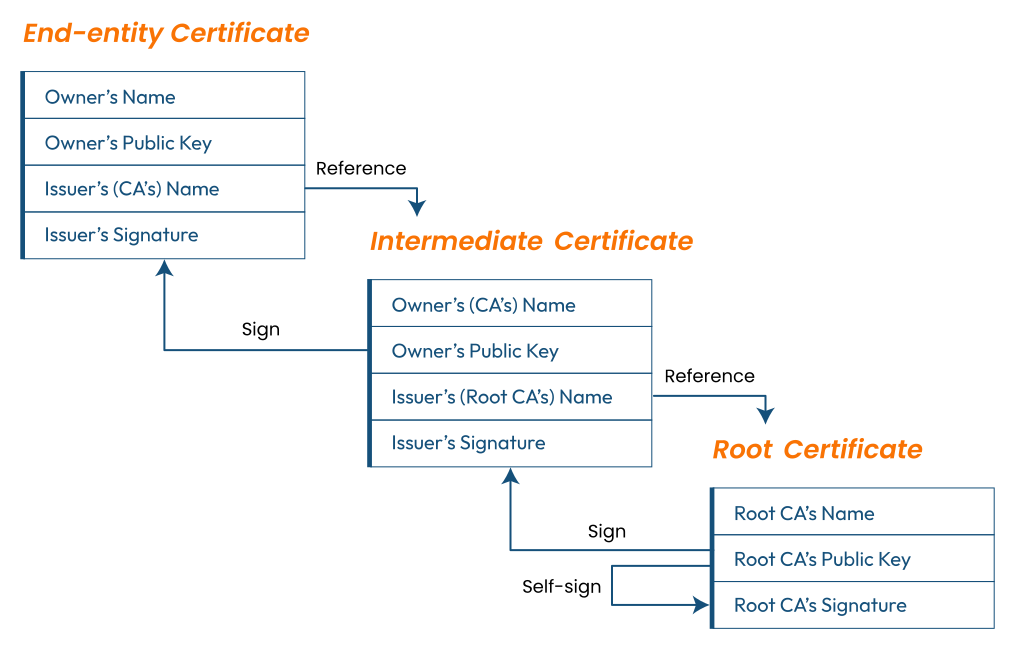
Root Certificate
The house of this digital certificate is the “trust store”, and hence it resides there. Since its ownership lies with the issuing CA, they keep a sharp watch on these certificates.
Intermediate Certificate
These certificates are mediators between the secured root certificates and the server (endpoint) certificates. It is compulsory to have a single intermediate certificate in the chain, though there can be multiple ones too.
Server Certificate (SSL Certificate)
The signatures of all these certificates are verified, with the public key lying in the certificate to ensure its genuineness. When the last server certificate is positively verified, it’s proof that the SSL certificate is authentic and trustworthy.
If certificate chains are incomplete, i.e., have a missing certificate, the browsers tend to display an error
Final Words
It’s a challenging task to fathom these technicalities and handle these security certificates. Now that you have read this article, you may be aware that both these certificates are similar in nature and functions but still are very different from each other.
In a nutshell, both certificates are pivotal in the chain of trust of PKI. The absence of any will break its chain and trust. So, ensure to use both these certificates for securing your systems and digital infrastructure.


